
Over the years I have become more and more disillusioned with .mp3 and .AAC (iTunes) files. They both use lossy compression and the reasons for their existence are now creeping into doubt. Their high compression ratios enabled quick downloads and used up little disk space. Both are coming increasingly less relevant with the development of ultra-cheap hard disk drives and fast Internet connections. However, if you want to use lossless compression with your sound files by using a codec such as FLAC or OGG Vorbis, then you are out of luck if you use the proprietary iTunes software on your iPod.
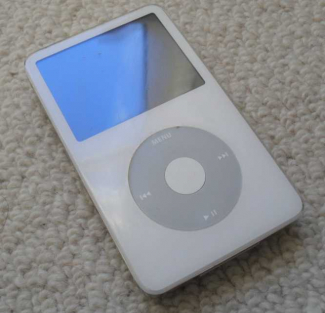
There is a solution, and that is Rockbox. Rockbox replaces the iTunes firmware in your iPod and has built-in functionality to play a myriad of different file formats, including my favourite, the lossless FLAC format. However, there is a problem - Rockbox is only available for iPods up to generation 5.5; the best available would be the now aging iPod Video 80GB. So, nothing else for it, I needed to track down a secondhand Video iPod 80GB. I picked up such an example from CIX for £82, albeit in white (a little effeminate for my tastes, but when you are buying secondhand, it's less easy to be picky).
Ok, time to get started. Instructions below.
1. Download the installer for Linux (in my case 32 bit) at http://www.rockbox.org/wiki/RockboxUtility#Download
2. Make sure the iPod is connected to the computer and then unzip into a temporary directory and run as the superuser:
badzilla@laptop4:~> cd /tmp
badzilla@laptop4:/tmp> ls Rock*
RockboxUtility-v1.2.8.tar.bz2
badzilla@laptop4:/tmp> bunzip2 Rockbox*
badzilla@laptop4:/tmp> tar xvf Rockbox*
RockboxUtility-v1.2.8/
RockboxUtility-v1.2.8/RockboxUtility
badzilla@laptop4:/tmp> cd Rock*
badzilla@laptop4:/tmp/RockboxUtility-v1.2.8> ls
RockboxUtility
badzilla@laptop4:/tmp/RockboxUtility-v1.2.8> file *
RockboxUtility: ELF 32-bit LSB executable, Intel 80386, version 1 (SYSV), dynamically linked (uses shared libs), for GNU/Linux 2.6.9, stripped
badzilla@laptop4:/tmp/RockboxUtility-v1.2.8> su
Password:
laptop4:/tmp/RockboxUtility-v1.2.8 # ./Rockbox* &
The easiest way of converting your CDs to FLAC files is by using Grip which is a very convenient GUI for ripping music. You will need to configure it to use FLAC - Grip is no more than a front-end wrapper, but can be used with a variety of rippers, for instance lame could be another option. By using Grip you just need to feed a CD into your drive and click and forget whilst Grip goes to work. Easy!
If you have downloaded videos from YouTube they will need converting to mpeg2 format with a resolution of 320x240 (4:3 ratio) or 320:180 (16:9 ratio). For more information on this, refer to http://www.rockbox.org/wiki/PluginMpegplayer. To find your .flv files, use the following command from the top level of your music folder:
badzilla@laptop4:~> cd ~/Music
badzilla@laptop4:~/Music> find . -name "*.flv"
./Madonna/Madonna___Hung_Up__video.flv
./Madonna/Madonna___Ray_Of_Light__Official_Video.flv
./Flo Rida - Club Can't Handle Me/Flo_Rida___Club_Can_t_Handle_Me_ft._David_Guetta__Official_Music_Video____Step_Up_3D.flv
./Roll Deep/Roll_Deep___Green_Light_Official_Video__HD____Out_Now_on_Itunes.flv
./The Script - Science & Faith/The_Script___For_The_First_Time.flv
./Seal/Seal___Kiss_From_A_Rose__Official_Music_Video_720p_HD____Lyrics.flv
./Lady Gaga - The Fame Monster/Lady_Gaga___Bad_Romance.flv
./Alex Gaudino - Destination Calabria/Alex_Gaudino___Destination_Calabria__Official_Music_Video.flv
./Charice/Charice___Pyramid__featuring_Iyaz___Video.flv
badzilla@laptop4:~/Music>
ffmpeg -i [inputfilename] -s [displayresolution] -vcodec mpeg2video -b -ab [audio bitrate] -ac [audio channels] -ar 44100 -acodec [audio codec] [outputfilename]
badzilla@laptop4:~/Music> cd Madonna

badzilla@laptop4:~/Music/Madonna> ffmpeg -i Madonna___Hung_Up__video.flv -s 320:240 -vcodec mpeg2video -b 200k -ab 192k -ac 2 -ar 44100 -acodec libmp3lame Madonna__Hung_Up.mpg
FFmpeg version SVN-r25320, Copyright (c) 2000-2010 the FFmpeg developers
  built on Oct 14 2010 17:24:48 with gcc 4.5.0 20100604 [gcc-4_5-branch revision 160292]
  configuration: --shlibdir=/usr/lib --prefix=/usr --mandir=/usr/share/man --libdir=/usr/lib --enable-shared --enable-libmp3lame --enable-libvorbis --enable-libtheora --enable-libspeex --enable-libxvid --enable-postproc --enable-gpl --enable-x11grab --extra-cflags='-fomit-frame-pointer -fmessage-length=0 -O2 -Wall -D_FORTIFY_SOURCE=2 -fstack-protector -funwind-tables -fasynchronous-unwind-tables -D_LARGEFILE_SOURCE -D_FILE_OFFSET_BITS=64 -I/usr/include/gsm' --enable-libschroedinger --enable-libdirac --enable-libgsm --enable-avfilter --enable-libvpx --enable-version3 --enable-libopencore-amrnb --enable-libopencore-amrwb --enable-libx264 --enable-libdc1394 --enable-pthreads
  libavutil     50.32. 0 / 50.32. 0
  libavcore      0. 9. 0 /  0. 9. 0
  libavcodec    52.92. 0 / 52.92. 0
  libavformat   52.79. 0 / 52.79. 0
  libavdevice   52. 2. 2 / 52. 2. 2
  libavfilter    1.48. 0 /  1.48. 0
  libswscale     0.12. 0 /  0.12. 0
  libpostproc   51. 2. 0 / 51. 2. 0
[flv @ 0x807dc30] Estimating duration from bitrate, this may be inaccurate

Seems stream 0 codec frame rate differs from container frame rate: 59.94 (2997/50) -> 29.92 (359/12)
Input #0, flv, from 'Madonna___Hung_Up__video.flv':
  Metadata:
    duration        : 327
    starttime       : 0
    totalduration   : 327
    width           : 480
    height          : 360
    videodatarate   : 802
    audiodatarate   : 124
    totaldatarate   : 933
    framerate       : 30
    bytelength      : 38163304
    canseekontime   : true
    sourcedata      : B4A7D6987HH1289485524753234
    purl            :
    pmsg            :
  Duration: 00:05:26.66, start: 0.000000, bitrate: 947 kb/s
    Stream #0.0: Video: h264, yuv420p, 480x360 [PAR 1:1 DAR 4:3], 820 kb/s, 29.92 tbr, 1k tbn, 59.94 tbc
    Stream #0.1: Audio: aac, 44100 Hz, stereo, s16, 127 kb/s
[buffer @ 0x807fc90] w:480 h:360 pixfmt:yuv420p
[scale @ 0x8085800] w:480 h:360 fmt:yuv420p -> w:320 h:240 fmt:yuv420p flags:0xa0000004
Output #0, mpeg, to 'Madonna__Hung_Up.mpg':
  Metadata:
    encoder         : Lavf52.79.0
    Stream #0.0: Video: mpeg2video, yuv420p, 320x240 [PAR 1:1 DAR 4:3], q=2-31, 200 kb/s, 90k tbn, 29.97 tbc
    Stream #0.1: Audio: libmp3lame, 44100 Hz, stereo, s16, 192 kb/s
Stream mapping:
  Stream #0.0 -> #0.0
  Stream #0.1 -> #0.1
Press [q] to stop encoding
frame= 9791 fps=158 q=24.8 Lsize=   16590kB time=326.66 bitrate= 416.0kbits/s
video:8735kB audio:7670kB global headers:0kB muxing overhead 1.125369%
badzilla@laptop4:~/Music/Madonna>
badzilla@laptop4:/tmp> java -jar RockAA_*
badzilla@laptop4:/tmp>
Short Read Error
First time through I got a short read diagnostic - should this happen to you, boot your iPod in Windows, and in iTunes reset the device's settings. At the same time you can change the iPod's name. Mine was "CEX'S IPOD" which I changed to "BADZILLA" of course!
Tracks Skipping and Sticking
I used Amarok to copy all my music from my laptop to the iPod. This turned out to be an extraordinarily bad decision. When I played back the files through my iPod I discovered to my horror the majority of my tracks either skipped (by jumping straight to the next track) or stuck. I traced the problem by using the cksum command. This outputs the checksum of the file, and by comparison against the original on your hard disk, you can determine whether the track has become corrupted during the transfer. Below is an example of a correctly checksumed file. To be sure of accurate copying I used the Linux cp.
badzilla@laptop4:~> cd /media/BAD*/Coldplay/X*
badzilla@laptop4:/media/BADZILLA/Coldplay/XY> ls
01 Coldplay - XY - Square One.flac     06 Coldplay - XY - XY.flac                11 Coldplay - XY - Swallowed In The Sea.flac
02 Coldplay - XY - What If.flac        07 Coldplay - XY - Speed Of Sound.flac    12 Coldplay - XY - Twisted Logic.flac
03 Coldplay - XY - White Shadows.flac  08 Coldplay - XY - A Message.flac         13 Coldplay - XY - til Kingdom Come.flac
04 Coldplay - XY - Fix You.flac        09 Coldplay - XY - Low.flac
05 Coldplay - XY - Talk.flac           10 Coldplay - XY - The Hardest Part.flac
badzilla@laptop4:/media/BADZILLA/Coldplay/XY> cksum 01*
1501054455 35217536 01 Coldplay - XY - Square One.flac
badzilla@laptop4:/media/BADZILLA/Coldplay/XY> cksum ~/Music/Coldplay/X*/01*
1501054455 35217536 /home/badzilla/Music/Coldplay/XY/01 Coldplay - XY - Square One.flac
badzilla@laptop4:/media/BADZILLA/Coldplay/XY>
*UPDATE* I may be guilty of giving Amarok a bad reputation. In reality my 2nd hand iPod Video has been bedeviled with disk i/o problems which probably points more to hardware issues than software. Even after using the Linux cp command I was still getting tracks skipping and sticking. So, I wrote a shell script to check the checksum differences between my laptop hard drive and the iPod's hard drive - follow the link Linux-Shell-Script-to-cksum-and-Compare-Local-and-iPod-Disks
Database Creation Hangs
I repeatedly attempted to build my database, only for the build to hang requiring a reboot. This indicates a corrupt file that is choking the database initialisation script. The best way to track this down if you have many thousands of tracks is to use the database_ignore method. A zero length file called database_ignore in a directory will mean that the initiialisation script will not add files in that directory to the database. So add this file to every directory, then remove it one by one until you track down the fault. Run this command below to add the file to every directory.
badzilla@laptop4:~/Music> cd /media/BAD*
badzilla@laptop4:/media/BADZILLA> find . -type d -exec touch {}/database.ignore \;
Note well that despite having the database.ignore files in the directories, the file count will still be displayed during the database build process since the script still has to traverse the tree.
Rockbox certainly doesn't respond well to embedded album art in the id tags. If you are having problems with the database creation hanging, you should look at this first. The best tool for this sort of analysis is Easytag.
Mounted as Read-only
If you get this error, which happened to me all of a sudden after being able to write to my iPod, it means there is a disk error. The best way of fixing this is to boot into Windows and perform a check disk which will repair the errors and put the recovered files in a directory.