
My favourite presentation at DrupalCamp London 2018 was Turbocharge Your Agency given by DRUD Tech co-founder Kevin Bridges and Jeffrey A. "jam" McGuire. They talked at length about the container solution ddev which enables developers to manage their local environments and thus optimise their time and in addition save their configuration under source control. Furthermore the demonstration showed that it was possible to flip between different configurations with different Drupal versions easily and quickly. The solution found here uses Docker and is wrapped by the lightning fast Golang.
I've been thinking for a while about moving from my existing hand crafted Virtual Machine towards Docker. My VM's configuration isn't under source control management, and has built up over the years into quite a complex beast. I have Jenkins, phing, composer, Drupal console, Mail Catcher, Compass, node, npm, Python, nginx, Apache, MariaDB and MongoDB that I can remember off the top of my head. It's becoming a difficult proposition to keep it all working. When I need to run a different version of PHP I manually switch simlinks around. Oh for something easier.
So I elected to investigate whether Drud Tech's offering could possibly help out. The demonstration given by their guys at DrupalCamp London 2018 showed the ease of moving between D7 and D8 repos. However they were fresh builds and for the tool to be of value to me, it would have to work from pre-existing codebases.
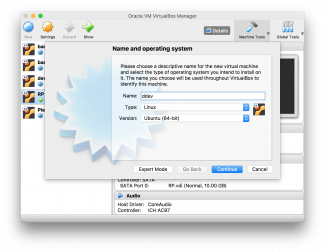
This was purely a Proof of Concept so as a consequence I needed to keep anything I did in a ring-fenced environment. Therefore a VirtualBox Ubuntu 16.04LTS image was used as a starting point. I won't provide screenshots of the entire build process since I have previous blogs to cover this.
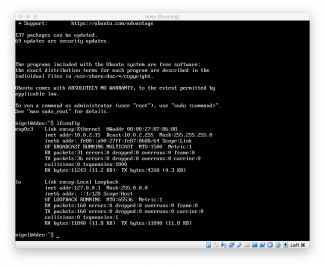
Once the build has completed and I have logged in I issue a ifconfig command to determine the IP address which is 10.0.2.15 (second screenshot). This will need to be used with the network configuration.
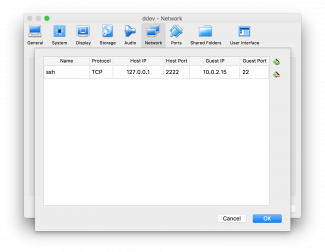
When I was building the VM I kept the default network configuration which is NAT. I have moved away from using Bridged Adapter. A bridged adapter on the face of it is very convenient - it automatically gets an IP address via DHCP from my ISP provided router at home, in the 192.168.0.0 range. However this falls foul at client sites with security policies prohibiting unknown MAC Addresses, and Internet cafes that don't use the same IP range - it simply won't work.
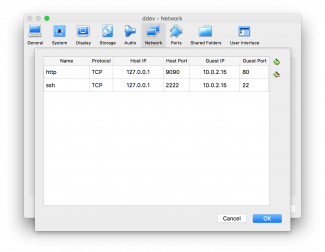
The solution is to use NAT and use the port forwarding facility. Navigate to Settings -> Network -> Advanced -> Port Forwarding and add values for ssh as per the third screenshot above.
$ ssh -p 2222 nigel@127.0.0.1
The authenticity of host '[127.0.0.1]:2222 ([127.0.0.1]:2222)' can't be established.
ECDSA key fingerprint is SHA256:VRNxWpagSl2DGz7dmgRjBqdDdadXITdPPkItrMR9k38.
Are you sure you want to continue connecting (yes/no)? yes
Warning: Permanently added '[127.0.0.1]:2222' (ECDSA) to the list of known hosts.
nigel@127.0.0.1's password:
Welcome to Ubuntu 16.04.3 LTS (GNU/Linux 4.4.0-87-generic x86_64)

 * Documentation:  https://help.ubuntu.com
 * Management:     https://landscape.canonical.com
 * Support:        https://ubuntu.com/advantage

137 packages can be updated.
69 updates are security updates.


Last login: Mon Mar  5 21:50:35 2018
To run a command as administrator (user "root"), use "sudo <command>".
See "man sudo_root" for details.
nigel@ddev:~$ sudo apt-get update
[sudo] password for nigel:
Hit:1 http://security.ubuntu.com/ubuntu xenial-security InRelease
Hit:2 http://gb.archive.ubuntu.com/ubuntu xenial InRelease
Hit:3 http://gb.archive.ubuntu.com/ubuntu xenial-updates InRelease
Hit:4 http://gb.archive.ubuntu.com/ubuntu xenial-backports InRelease
Reading package lists... Done
nigel@ddev:~$ sudo apt-get install \
>     apt-transport-https \
>     ca-certificates \
>     curl \
>     software-properties-common
Reading package lists... Done
Building dependency tree
Reading state information... Done
apt-transport-https is already the newest version (1.2.25).
ca-certificates is already the newest version (20170717~16.04.1).
curl is already the newest version (7.47.0-1ubuntu2.6).
software-properties-common is already the newest version (0.96.20.7).
0 to upgrade, 0 to newly install, 0 to remove and 2 not to upgrade.
nigel@ddev:~$ curl -fsSL https://download.docker.com/linux/ubuntu/gpg | sudo apt-key add -
OK
nigel@ddev:~$ sudo apt-key fingerprint 0EBFCD88
pub   4096R/0EBFCD88 2017-02-22
      Key fingerprint = 9DC8 5822 9FC7 DD38 854A  E2D8 8D81 803C 0EBF CD88
uid                  Docker Release (CE deb) <docker@docker.com>
sub   4096R/F273FCD8 2017-02-22
nigel@ddev:~$ sudo add-apt-repository \
>    "deb [arch=amd64] https://download.docker.com/linux/ubuntu \
>    $(lsb_release -cs) \
>    stable"
nigel@ddev:~$ sudo apt-get update
Hit:1 http://security.ubuntu.com/ubuntu xenial-security InRelease
Hit:2 http://gb.archive.ubuntu.com/ubuntu xenial InRelease
Hit:3 http://gb.archive.ubuntu.com/ubuntu xenial-updates InRelease
Hit:4 http://gb.archive.ubuntu.com/ubuntu xenial-backports InRelease
Get:5 https://download.docker.com/linux/ubuntu xenial InRelease [65.8 kB]
Get:6 https://download.docker.com/linux/ubuntu xenial/stable amd64 Packages [3,329 B]
Fetched 69.1 kB in 0s (140 kB/s)
Reading package lists... Done
nigel@ddev:~$ sudo apt-get update
nigel@ddev:~$ sudo docker run hello-world
[sudo] password for nigel:
Unable to find image 'hello-world:latest' locally
latest: Pulling from library/hello-world
ca4f61b1923c: Pull complete
Digest: sha256:083de497cff944f969d8499ab94f07134c50bcf5e6b9559b27182d3fa80ce3f7
Status: Downloaded newer image for hello-world:latest

Hello from Docker!
This message shows that your installation appears to be working correctly.
nigel@ddev:~$ sudo curl -L https://github.com/docker/compose/releases/download/1.19.0/docker-compose-`uname -s`-`uname -m` -o /usr/local/bin/docker-compose
  % Total    % Received % Xferd  Average Speed   Time    Time     Time  Current
                                 Dload  Upload   Total   Spent    Left  Speed
100   617    0   617    0     0    795      0 --:--:-- --:--:-- --:--:--   795
100 8288k  100 8288k    0     0   355k      0  0:00:23  0:00:23 --:--:--  196k
nigel@ddev:~$ sudo chmod +x /usr/local/bin/docker-compose
nigel@ddev:~$ docker-compose --version
docker-compose version 1.19.0, build 9e633ef
nigel@ddev:~/projects/meedjum$ sudo systemctl enable docker
Synchronizing state of docker.service with SysV init with /lib/systemd/systemd-sysv-install...
Executing /lib/systemd/systemd-sysv-install enable docker
nigel@ddev:~/projects/meedjum$ sudo usermod -aG docker $(whoami)
nigel@ddev:~/projects/meedjum$ sudo su
root@ddev:/home/nigel/projects/meedjum# init 6
nigel@ddev:~$ curl https://raw.githubusercontent.com/drud/ddev/master/install_ddev.sh | bash
  % Total    % Received % Xferd  Average Speed   Time    Time     Time  Current
                                 Dload  Upload   Total   Spent    Left  Speed
100  2545  100  2545    0     0   5821      0 --:--:-- --:--:-- --:--:--  5823
ddev_linux.v0.15.0.tar.gz: OK
Download verified. Ready to place ddev in your /usr/local/bin.
Running "sudo mv /tmp/ddev /usr/local/bin/" Please enter your password if prompted.
[sudo] password for nigel:
Bash completion for ddev was not installed. You may manually install /tmp/ddev_bash_completion.sh in your bash_completions.d directory.
ddev is now installed. Run "ddev" to verify your installation and see usage.
nigel@ddev:~$ ddev
This Command Line Interface (CLI) gives you the ability to interact with the ddev to create a development environment.

Usage:
  ddev [command]

Available Commands:
  auth-pantheon Provide a machine token for the global pantheon auth.
  config        Create or modify a ddev project configuration in the current directory
  describe      Get a detailed description of a running ddev project.
  exec          Execute a shell command in the container for a service. Uses the web service by default.
  help          Help about any command
  hostname      Manage your hostfile entries.
  import-db     Import the database of an existing project to the dev environment.
  import-files  Import the uploaded files directory of an existing project to the default public upload directory of your project.
  list          List projects
  logs          Get the logs from your running services.
  pull          Import files and database using a configured provider plugin.
  remove        Remove the development environment for a project.
  restart       Restart the development environment for a project.
  ssh           Starts a shell session in the container for a service. Uses web service by default.
  start         Start a ddev project.
  stop          Stop the development environment for a project.
  version       print ddev version and component versions

Flags:
  -h, --help          help for ddev
  -j, --json-output   If true, user-oriented output will be in JSON format.

Use "ddev [command] --help" for more information about a command.
nigel@ddev:~$ mkdir projects
nigel@ddev:~$ cd projects/
nigel@ddev:~/projects$ git clone git@github.com:sanddevil/meedjum.git
Cloning into 'meedjum'...
nigel@ddev:~/projects/meedjum$ ddev config
Creating a new ddev project config in the current directory (/home/nigel/projects/meedjum)
Once completed, your configuration will be written to /home/nigel/projects/meedjum/.ddev/config.yaml

Project name (meedjum):

The docroot is the directory from which your site is served. This is a relative path from your project root (/home/nigel/projects/meedjum)
You may leave this value blank if your site files are in the project root
Docroot Location (docroot):
Found a php codebase at /home/nigel/projects/meedjum/docroot.
Project Type [php, drupal6, drupal7, drupal8, wordpress, typo3, backdrop] (php): drupal8
Configuration complete. You may now run 'ddev start'.
nigel@ddev:~/projects/meedjum$ ddev start
Network ddev_default created
Starting environment for meedjum...
ddev needs to add an entry to your hostfile.
It will require root privileges via the sudo command, so you may be required
to enter your password for sudo. ddev is about to issue the command:
    sudo /usr/local/bin/ddev hostname meedjum.ddev.local 127.0.0.1
Please enter your password if prompted.
Running Command  Command=sudo /usr/local/bin/ddev hostname meedjum.ddev.local 127.0.0.1
[sudo] password for nigel:
Pulling db (drud/mariadb-local:v0.8.0)...
Creating ddev-meedjum-db ... done
Pulling dba (drud/phpmyadmin:v0.2.0)...
Creating ddev-meedjum-web ... done
Creating ddev-meedjum-dba ...
Creating ddev-meedjum-web ...

Network ddev_default is external, skipping
Pulling ddev-router (drud/ddev-router:v0.5.0)...
Creating ddev-router ... done

Successfully started meedjum
Your project can be reached at http://meedjum.ddev.local and https://meedjum.ddev.local
nigel@ddev:~$ sudo apt-get update
Hit:1 http://security.ubuntu.com/ubuntu xenial-security InRelease
Hit:2 http://gb.archive.ubuntu.com/ubuntu xenial InRelease
Hit:3 http://gb.archive.ubuntu.com/ubuntu xenial-updates InRelease
Hit:4 http://gb.archive.ubuntu.com/ubuntu xenial-backports InRelease
Hit:5 https://download.docker.com/linux/ubuntu xenial InRelease
Reading package lists... Done
nigel@ddev:~$ sudo apt-get install curl php-cli php-mbstring git unzip
Reading package lists... Done
nigel@ddev:~$ curl -sS https://getcomposer.org/installer -o composer-setup.php
nigel@ddev:~$ sudo php composer-setup.php --install-dir=/usr/local/bin --filename=composer
All settings correct for using Composer
Downloading...

Composer (version 1.6.3) successfully installed to: /usr/local/bin/composer
Use it: php /usr/local/bin/composer
nigel@ddev:~$ composer
   ______
  / ____/___  ____ ___  ____  ____  ________  _____
 / /   / __ \/ __ `__ \/ __ \/ __ \/ ___/ _ \/ ___/
/ /___/ /_/ / / / / / / /_/ / /_/ (__  )  __/ /
\____/\____/_/ /_/ /_/ .___/\____/____/\___/_/
                    /_/
Composer version 1.6.3 2018-01-31 16:28:17
The ddev start command creates a new subdirectory called .ddev in the project's root directory. Within the directory we have config.yaml and docker-compose.yaml. The config file contains the configuration of our ddev project such as the version of PHP, webpage url, type of project (drupal8) amongst other items. The docker yaml file contains the container configuration.
Interaction with the ddev project can be accomplished in two ways, either with
ddev exec command
or by spawning a shell with
ddev ssh
and using exit to terminate the interactive session.
Our first requirement is to get dependencies into our D8 project since it is vendor-ised and uses composer as its dependency management.
nigel@ddev:~/projects/meedjum/docroot$ composer update --with-dependencies
Gathering patches for root package.
Loading composer repositories with package information
Updating dependencies (including require-dev)
Package operations: 51 installs, 0 updates, 0 removals
Gathering patches for root package.
Gathering patches for dependencies. This might take a minute.
nigel@ddev:~/projects/meedjum/docroot$ ddev exec drush updatedb
Performing node_update_8401                                          [ok]
Cache rebuild complete.                                              [ok]
Finished performing updates.                                         [ok]
The following updates are pending:

node module :
  8401 -   Run a node access rebuild, if required.

Do you wish to run all pending updates? (y/n): y
This is where things started to go awry. I already have a fully constructed settings.php and settings.local.php. The settings.php file contains my Memcached settings. However the memcache(d) PHP libraries aren't shipped in the ddev product. Obviously by that fact ddev doesn't support Memcached.
nigel@ddev:~/projects/meedjum/docroot/sites/default$ vi settings.local.php
nigel@ddev:~/projects/meedjum/docroot/sites/default$ ddev exec drush status
Drupal\memcache\MemcacheException: No Memcache extension found in /var/www/html/docroot/modules/contrib/memcache/src/DrupalMemcacheFactory.php on line 162 #0 /var/www/html/docroot/modules/contrib/memcache/src/DrupalMemcacheFactory.php(62): Drupal\memcache\DrupalMemcacheFactory->initialize()
<?php
// Memcache
//Memcache configuration
//$settings['memcache']['servers'] = ['127.0.0.1:11211' => 'default'];
//$settings['memcache']['bins'] = ['default' => 'default'];
//$settings['memcache']['key_prefix'] = 'badzillad8';
//$settings['cache']['default'] = 'cache.backend.memcache';
?>nigel@ddev:~/projects/meedjum/docroot/sites/default$ ddev import-db --extract-path /tmp Provide the path to the database you wish to import. Import path: /tmp/db-2018-03-10.sql.gz Failed to import database for meedjum: failed to write settings file for meedjum: Failed to get Drupal settings file path: settings files already exist and are being managed by the user
nigel@ddev:~/projects/meedjum/docroot/sites/default$ ddev exec drush sql-cli < /tmp/db-2018-03-10.sql
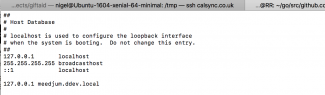
So I have added the entry to /etc/hosts of the working ddev domain name and the localhost IP address
127.0.0.1       localhost
255.255.255.255 broadcasthost
::1             localhost

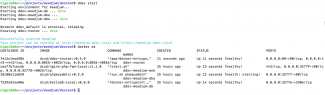
127.0.0.1 meedjum.ddev.localroot@ddev:/home/nigel# init 6 Connection to 127.0.0.1 closed by remote host. Connection to 127.0.0.1 closed. Nigels-MacBook-Pro:tmp nigel$ ssh -p 2222 nigel@127.0.0.1 nigel@ddev:~$ cd projects/meedjum/ nigel@ddev:~/projects/meedjum$ ddev start Starting environment for meedjum... nigel@ddev:~/projects/meedjum$ docker ps CONTAINER ID IMAGE COMMAND CREATED STATUS PORTS NAMES 5fd9a60cb90c drud/ddev-router:v0.5.0 "/app/docker-entrypo…" 10 seconds ago Up 10 seconds (healthy) 0.0.0.0:80->80/tcp, 0.0.0.0:443->443/tcp, 0.0.0.0:8025->8025/tcp, 0.0.0.0:8036->8036/tcp ddev-router cea77b7cbc6b drud/nginx-php-fpm-local:v1.1.0 "/start.sh" 7 hours ago Up 11 seconds (healthy) 443/tcp, 0.0.0.0:32771->80/tcp, 0.0.0.0:32770->8025/tcp ddev-meedjum-web 2dc08e116820 drud/phpmyadmin:v0.2.0 "/run.sh phpmyadmin" 7 hours ago Up 11 seconds (health: starting) 0.0.0.0:32769->80/tcp ddev-meedjum-dba f239a52ae806 drud/mariadb-local:v0.8.0 "/docker-entrypoint.…" 7 hours ago Up 12 seconds (healthy) 0.0.0.0:32768->3306/tcp ddev-meedjum-db
<?php
$settings['trusted_host_patterns'] = [
  'meedjum.test',
  'meedjum.ddev.local',
];
?>
nigel@ddev:~/projects/meedjum/docroot$ ddev import-files --src=/tmp/files.tar.gz
Successfully imported files for meedjum
nigel@ddev:~/projects/meedjum/docroot$ mv sites/default/files/files/* sites/default/files/.
nigel@ddev:~/projects/meedjum/docroot$ mv sites/default/files/files/.htaccess sites/default/files/.
nigel@ddev:~/projects/meedjum/docroot$ rmdir sites/default/files/files
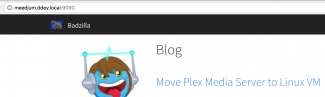
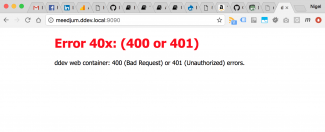
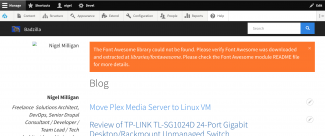
Ok so in the interim I fixed the missing Font Awesome library - not something I'd noticed before, but obviously it's been gitignored and it isn't in the composer.json file. Anyhoo the site is now fully functional and you can see from the URL bar I need to append the port :9090 as per my previous port forwarding fix.
Playing with ddev was an interesting experience, not without challenges, but ultimately rewarding. Here are some of the points I made as I went along.
- The ddev exec command is run as root. This is a problem because it basically means using composer with it - such as ddev exec composer update - would trash the file permissions of my codebase. Ownerships would become root, and that would lead to problems down the line. Composer should never be run as root. So the net effect is composer needs to be installed on the host system. Ideally I wanted a totally un-poluted filesystem without installing anything on the host beyond ddev. It also means since composer has a dependency on PHP, that needs to be installed, and now we have a system with different PHP CLI and FPM versions.
- I couldn't get the ddev import-db command to work. A minor inconvenience and of course it is easy to use alternatives with the command line or drush.
- Now I've got a working system - what next? I have a welter of phing targets to deploy my code, usually invoked by Jenkins. I could add phing at project level but how would I get Jenkins docker-ised up and running across all projects? I sense that could be tricky.
- I can see ddev's value. I would place it in a small agency with both legacy D6 and D7 support projects alongside new D8 and WP builds. I can't see it as an enterprise solution - there is too much missing such as Memcache and the previously mentioned phing and Jenkins.
But all in all I really enjoyed my Saturday watching the football whilst playing with ddev and writing this blog - despite my teams losing!