
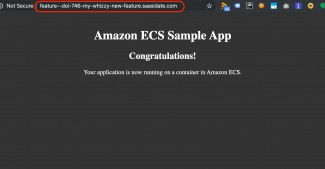
AWS Fargate is a relatively new product offering the capability of running Docker bundles as an ECS compute service on EC2 without the necessity for the user to have to orchestrate the underlying EC2 infrastructure. It is perfect for DevOps, and was the technology I chose as DevOps Architect at my current client. The client wanted standard CI/CD capabilities such as spinning up containerised copies of their website environment per feature branch to perform static analysis, automated testing, and also significantly, a persisting playground that QA or development personnel could use for manual testing and troubleshooting a feature (or hotfix) branch they are currently working on.
This is similar to the offering of both Platform.sh and Amazee Labs hosting solutions - developers can spin up their feature branches. Alas my client is locked into another host yet needed on-the-fly feature branch Docker bundles.
AWS Fargate tasks can achieve this, but out of the box it isn't possible to create public domain registration via ECS Service Discovery. The Fargate task is issued a bare IPv4 address which will obviously work but our requirement is to have a subdomain created per branch that would be of the format {hotfix|feature}--{jira ticket}-{suitable branch name}.{top level domain}. So an example would be:
feature--doi-746-my-whizzy-new-feature.clientdomain.dev
So whilst we can't create a subdomain like that natively, we can do it by retrieving the IP address from the ECS Fargate task, then add that IP to a public Route 53 Hosted Zone. Furthermore, since the Fargate task is run via a Jenkins pipeline job that uses shell scripts populated with AWS CLI, the good news is we can indeed complete the registration of subdomain also using the AWS CLI *and* have the DNS propagate within 60 seconds! Amazing! Let's dive into how we achieve this.
The solution will be built using the standard httpd Apache2 server sample Fargate task described on the AWS blog Tutorial: Creating a Cluster with a Fargate Task Using the AWS CLI. I added the task definition into the console, although it is also possible create a shell script and use AWS CLI. I have used the default cluster for brevity's sake, and the AWS account default VPC. I have also transferred a spare domain I had, saasidate.com, into Route 53 before I started the blog. This will be my tld and all the subdomains will be added off it. It's important that the ownership of the domain is transferred into Route 53 since otherwise subdomains will have authority issues if the parent domain is still registered to other domain providers such as GoDaddy or 123-Reg.
The solution I am putting together will use AWS CLI which by default returns JSON structured data. It is absolutely essential to use the Linux command line utility jq for parsing the JSON. Documentation on jq is readily available on the net.
The solution will need the following steps:
- Get the user's default VPC (or create a custom VPC if preferred. We'll need this at a few points in the code.
- Get a subnet from the VPC. Three subnets are created for use with the default VPC. I pick the first which is arbitrary.
- Get a security group. A new security group is created per task when using the console but that is unnecessary for the shell scripts we will be building. So in our script, check whether our 'standard' security group has been created. If so use it, if not then create a security group with an ingress port of 80 and a CIDR of 0.0.0.0/0 which allows access worldwide on TCP port 80.
- Run the Fargate task and loop / sleep until the task has a status of RUNNING.
- Get the network interface id of the task and interrogate it for the IP address.
- Get the hosted zone for the parent domain.
- Add a record set containing the feature branch subdomain to the parent domain's hosted zone.
- Create a new hosted zone using the feature branch.
Ok - let's crack on and put this into AWS CLI shell scripts.
VPC=`aws ec2 describe-vpcs | jq '.Vpcs[] | select(.IsDefault == true) | .VpcId' -r`
# Get the first subnet of the VPC
SUBNET=`aws ec2 describe-subnets | jq --arg VPC "$VPC" '.Subnets[] | select(.VpcId == $VPC) | .SubnetId' -r | head -n 1`
# Check if our security group for port 80 webserver already exists. Search for our funky unique description
SECURITY=`aws ec2 describe-security-groups | jq ' .SecurityGroups[] | select (.Description == "Ingress Port 80 Anywhere") | .GroupId' -r`

# Let's inspect what we got back.
if [[ $? -ne 0 ]]; then
	echo "describe-security-groups failed with code $?"
	exit $?
fi

# If we didn't get a security group then create
if [[ -z "$SECURITY" ]]; then
	SECURITY=`aws ec2 create-security-group \
		--description "Ingress Port 80 Anywhere" \
		--group-name "Fargate Webserver Port 80" \
		--vpc-id "$VPC" | jq .GroupId -r `


	aws ec2 authorize-security-group-ingress \
		--group-id "$SECURITY" \
		--ip-permissions "FromPort=80,ToPort=80,IpProtocol=TCP,IpRanges=[{CidrIp=0.0.0.0/0}]"
fi
# Run the task and parse the task ARN for polling later to determine its status
TASK=`aws ecs run-task \
	--cluster "default" \
	--task-definition "first-run-task-definition" \
	--network-configuration "awsvpcConfiguration={subnets=[${SUBNET}],securityGroups=[${SECURITY}],assignPublicIp=ENABLED}" \
	--launch-type FARGATE  | jq .tasks[0].taskArn -r | sed "s/.*\///" `

# Let's inspect what we got back. There should be a task identifier.
if [[ $? -ne 0 ]]; then
	echo "task-run failed with code $?"
	exit $?
fi

if [[ -z "$TASK" ]]; then
	echo "task-run could not create task"
	exit 1
fi
# Loop around until we see a RUNNING status or timeout after 10 x 30 second sleeps
for i in 1 2 3 4 5 6 7 8 9 10 11
do
	if [[ $i -eq 11 ]]; then
		echo "Timed out before could establish task is running"
		exit 1
	fi

	STATUS=`aws ecs describe-tasks --cluster="default" --tasks $TASK  | jq .tasks[0].lastStatus -r`

	# Did it exit unexpectedly?
	if [[ $? -ne 0 ]]; then
		echo "describe-tasks failed with code $?"
		exit $?
	fi

	if [[ "$STATUS" = "RUNNING"  ]]; then
		break
	fi

	sleep 30
done
# Get the network Interface id
ENI=`aws ecs describe-tasks --cluster="default" --tasks $TASK  | jq '.tasks[0].attachments[0].details[] | select(.name == "networkInterfaceId") | .value' -r `

# Let's inspect what we got back. There should be a network interface id.
if [[ $? -ne 0 ]]; then
	echo "describe-tasks failed with code $?"
	exit $?
fi

if [[ -z "$ENI" ]]; then
	echo "describe-tasks could not establish eni"
	exit 1
fi
PUBLIC_IP=`aws ec2 describe-network-interfaces | jq --arg ENI "$ENI" '.NetworkInterfaces[] | select(.NetworkInterfaceId == $ENI) | .PrivateIpAddresses[0].Association.PublicIp' -r`

# Did we get an IP address?
if [[ $? -ne 0 ]]; then
	echo "describe-network-interfaces failed with code $?"
	exit $?
fi

if [[ -z "$PUBLIC_IP" ]]; then
	echo "describe-network-interfaces could not retrieve public IP address"
	exit 1
fi
if [[ -z $1 ]] || [[ -z $2 ]]; then
	echo "usage: parent_domain_name feature_branch_name"
	exit 1
fi

BRANCH=$2.$1
PARENT=$1.
PARENT_ZONE=`aws route53 list-hosted-zones-by-name | jq --arg PARENT "$PARENT" '.HostedZones[] | select(.Name == $PARENT) | .Id' -r | sed "s/.*\///"`
BATCH=$(cat <<EOT
{
  "Comment":"CREATE/DELETE/UPSERT a record",
  "Changes":[{
    "Action": "UPSERT",
    		  "ResourceRecordSet": {
    		  	"Name": "${BRANCH}",
    		  	"Type": "A",
    		  	"TTL": 300,
    		  	"ResourceRecords": [{ "Value": "${PUBLIC_IP}"}]
    		  }
  }]
}
EOT
)


# Use the hosted zone of the tld
aws route53 change-resource-record-sets \
	--hosted-zone-id $PARENT_ZONE \
	--change-batch "$BATCH"
timestamp=$(date +%s)

# Now create a new hosted zone of the feature branch
aws route53 create-hosted-zone \
	--name "$BRANCH" \
	--caller-reference "$timestamp"
#!/bin/bash

# Script to assign a public IP address issued by a Fargate task to a subdomain

if [[ -z $1 ]] || [[ -z $2 ]]; then
	echo "usage: parent_domain_name feature_branch_name"
	exit 1
fi

BRANCH=$2.$1
PARENT=$1.


# Get the default VPC.
VPC=`aws ec2 describe-vpcs | jq '.Vpcs[] | select(.IsDefault == true) | .VpcId' -r`

# Get the first subnet of the VPC
SUBNET=`aws ec2 describe-subnets | jq --arg VPC "$VPC" '.Subnets[] | select(.VpcId == $VPC) | .SubnetId' -r | head -n 1`

# Check if our security group for port 80 webserver already exists. Search for our funky unique description
SECURITY=`aws ec2 describe-security-groups | jq ' .SecurityGroups[] | select (.Description == "Ingress Port 80 Anywhere") | .GroupId' -r`

# Let's inspect what we got back.
if [[ $? -ne 0 ]]; then
	echo "describe-security-groups failed with code $?"
	exit $?
fi

# If we didn't get a security group then create
if [[ "$SECURITY" = "" ]]; then
	SECURITY=`aws ec2 create-security-group \
		--description "Ingress Port 80 Anywhere" \
		--group-name "Fargate Webserver Port 80" \
		--vpc-id "$VPC" | jq .GroupId -r `


	aws ec2 authorize-security-group-ingress \
		--group-id "$SECURITY" \
		--ip-permissions "FromPort=80,ToPort=80,IpProtocol=TCP,IpRanges=[{CidrIp=0.0.0.0/0}]"
fi

# Run the task and parse the task ARN for polling later to determine its status
TASK=`aws ecs run-task \
	--cluster "default" \
	--task-definition "first-run-task-definition" \
	--network-configuration "awsvpcConfiguration={subnets=[${SUBNET}],securityGroups=[${SECURITY}],assignPublicIp=ENABLED}" \
	--launch-type FARGATE  | jq .tasks[0].taskArn -r | sed "s/.*\///" `

# Let's inspect what we got back. There should be a task identifier.
if [[ $? -ne 0 ]]; then
	echo "task-run failed with code $?"
	exit $?
fi

if [[ -z "$TASK" ]]; then
	echo "task-run could not create task"
	exit 1
fi

# Loop around until we see a RUNNING status or timeout after 10 x 30 second sleeps
for i in 1 2 3 4 5 6 7 8 9 10 11
do
	if [[ $i -eq 11 ]]; then
		echo "Timed out before could establish task is running"
		exit 1
	fi

	STATUS=`aws ecs describe-tasks --cluster="default" --tasks $TASK  | jq .tasks[0].lastStatus -r`

	# Did it exit unexpectedly?
	if [[ $? -ne 0 ]]; then
		echo "describe-tasks failed with code $?"
		exit $?
	fi

	if [[ "$STATUS" = "RUNNING"  ]]; then
		break
	fi

	sleep 30
done


# Get the network Interface id
ENI=`aws ecs describe-tasks --cluster="default" --tasks $TASK  | jq '.tasks[0].attachments[0].details[] | select(.name == "networkInterfaceId") | .value' -r `

# Let's inspect what we got back. There should be a network interface id.
if [[ $? -ne 0 ]]; then
	echo "describe-tasks failed with code $?"
	exit $?
fi

if [[ -z "$ENI" ]]; then
	echo "describe-tasks could not establish eni"
	exit 1
fi


# Get the Public IP Address
PUBLIC_IP=`aws ec2 describe-network-interfaces | jq --arg ENI "$ENI" '.NetworkInterfaces[] | select(.NetworkInterfaceId == $ENI) | .PrivateIpAddresses[0].Association.PublicIp' -r`

# Did we get an IP address?
if [[ $? -ne 0 ]]; then
	echo "describe-network-interfaces failed with code $?"
	exit $?
fi

if [[ -z "$PUBLIC_IP" ]]; then
	echo "describe-network-interfaces could not retrieve public IP address"
	exit 1
fi

BATCH=$(cat <<EOT
{
  "Comment":"CREATE/DELETE/UPSERT a record",
  "Changes":[{
    "Action": "UPSERT",
    		  "ResourceRecordSet": {
    		  	"Name": "${BRANCH}",
    		  	"Type": "A",
    		  	"TTL": 300,
    		  	"ResourceRecords": [{ "Value": "${PUBLIC_IP}"}]
    		  }
  }]
}
EOT
)

PARENT_ZONE=`aws route53 list-hosted-zones-by-name | jq --arg PARENT "$PARENT" '.HostedZones[] | select(.Name == $PARENT) | .Id' -r | sed "s/.*\///"`

aws route53 change-resource-record-sets \
	--hosted-zone-id $PARENT_ZONE \
	--change-batch "$BATCH"


timestamp=$(date +%s)

# Now create a new hosted zone of the feature branch
aws route53 create-hosted-zone \
	--name "$BRANCH" \
	--caller-reference "$timestamp"
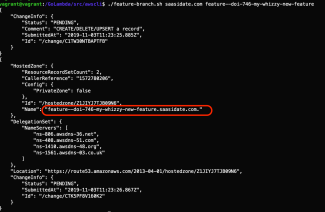
$ ./feature-branch.sh saasidate.com feature--doi-746-my-whizzy-new-feature
Obviously the first check is to copy and paste the url of the feature branch into a browser and see if it loads. An example of this is the blog heading image at the top of the page.
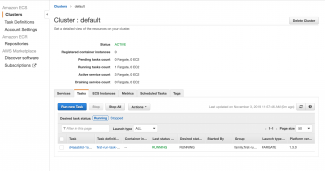
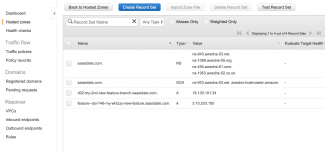
Also the AWS console is the place to check everything is as required. Navigate to ECS -> default -> Tasks and you should see a screenshot similar to the first one immediately above. This is the task we invoked from inside our shell script. Now navigate to Route 53 -> Hosted Zones -> {domain name} and you can see the feature branch and its IP address.
New hosted zones will normally propagate in 60 seconds in Route 53 - but it would be good if the script above polls Route 53 every 10 seconds or so and reports back the subdomain url and the IP address once the propagation has completed. This should be surfaced on the command line as a minimum, but perhaps a notification on Slack would be even better. Both options are trivial.
Whilst the idea is that the Fargate tasks should persist, they shouldn't be around forever. Therefore there needs to be clear up activities to remove the feature subdomain from the parent domain's hosted zone, and the subdomain hosted zone. Also there obviously needs a step to stop the Fargate task.
There are caveats to this solution - but for my use case, it's one of those rare occurrences in life that the caveats don't apply to me.
Firstly, this solution will only work with a Fargate task and not an ECS service running a Fargate task. Tasks should be run as services for production environments since services give you great things like replication, and health percentages against number of running tasks. There is therefore no scaling, no load balancing, no DDOS protection in what I'm offering here.
Fargate tasks run in isolation are perfect for spun up short living environments such as playgrounds for devs and QAs to run manual tests against or troubleshoot development issues - which is exactly my use case.