
Welcome to a series of blogs on hosting Drupal 9 (or legacy Drupal 8) sites on AWS Fargate. Fargate can now be considered a mature product, and provides a simple serverless containerised platform for hosting web apps. It offers considerable savings over traditional Virtual servers without, if configured correctly, loss of performance. Furthermore it offers greater simplicity of operation and setup then its AWS sibling offering ECS over EC2, and again a cost saving.
The blogs in this series will cover important considerations such as the pipelines to deploy your codebase within Docker images, and their storage; set up of the Drupal S3FS module along with the CloudFront accelerator and S3 object store; auto scaling of the Fargate tasks; load testing your app to ensure you are fully optimised; and how to run your Drush commands in short living Fargate tasks.
This first blog will cover your team's local environment and how its build will ensure your path to Fargate deploy is smooth, with as much reuse of the configuration in production as possible.
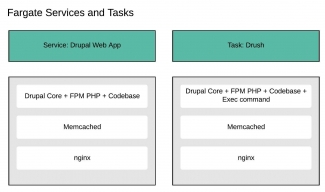
The objective is to stand up a Fargate task running as a service which will be the web app, and it will persist and auto scale. Also have Fargate tasks to run which will run Drush commands, stood up on a per Drush command basis, and terminating after each Drush command completes. The diagram above shows the Docker images requires to achieve our goal.
Drupal Core + FPM PHP + Codebase
The intention is to use the official Drupal FPM Docker image using Alpine, and be as up to date as possible with the versioning. Note that the Alpine build has been chosen since it's an extremely lightweight version of Linux, based on busybox which has a very small footprint. This comes at a price - those with Ubuntu experience will have to learn new commands. For instance Alpine uses the apk package manager instead of apt-get. The web app's codebase - ie all the configuration and custom modules and themes created by the dev team - will be copied into this image.
Drupal Core + FPM PHP + Codebase + Exec command
This will be the Fargate task to run one off Drush commands. Since the codebase will already contain Drush binaries in vendor/bin/drush, it will be the same as the previously mentioned image. Notwithstanding this, it won't persist. It will use the Fargate equivalent of the Docker command to exec a particular command and then quit.
Memcached
I have elected to run individual Memcached caching in each task running in the Web App service. Memcached will be used for caching the Drupal MySQL cache tables and for page caching for anonymous users. There is an alternative strategy to this - centralise the caching using for instance the AWS ElastiCache with Memcached product. Each task in the web service would have an endpoint to the same centralised ElastiCache instance. This would be the preferred option if your website is largely serving logged in traffic, and if you are running an eCommerce site with the users' baskets stored in Memcached. Since that doesn't apply to my own site, and I would like to keep costs down too, my feeling is having Memcached as part of the Fargate task is a better fit.
nginx
A web server is needed, and I've elected for nginx although Apache would also be a good choice. My rationale for selecting nginx is I would like to add the feature of nginx serving slightly stale cached pages when the origin is returning 5xx errors. This would give a seamless switch-over when a task becomes unhealthy - during the period AWS determines that a task is returning errors and has crossed the unhealthy threshold, nginx could still serve pages which would be less than 5 minutes old. The task would then be drained and removed from the pool with no problem noticeable to the end user. This will be the subject of a blog at a later date.
Those who know me well will know I am not an advocate of using my laptop's OS for development purposes. The reason being that with multiple clients and with multiple projects in each, my host OS would quickly become a mess of different development tooling and versions which could collide and could also generate inconsistencies with other devs in the team should say different versions of bin files end up in the $PATH.
My ethos has always been do not pollute your host OS! Always use VMs for development!
I have created my own VM for Docker based implementations. My belief is if the target deploy is using Docker containers then the local development environment should match this as much as is practicable. In fact it's impossible to match the ECS/Fargate environment exactly, but it is certainly possible to use Docker with docker-compose to simulate closely what will be seen in prod.
My VM can be found in GitHub by clicking on this link. It is a very lightweight VM and can be orchestrated easily using Vagrant and Ansible. PHP and MySQL are deliberately not included in the playbook since all development work will be undertaken by using Docker containers.
All my localhost config examples in this blog will have come from using my DockerVM mentioned above. If you intend to follow this blog closely, you will need to install it, but read the instructions in the README.md carefully!
Once you've got a lightweight VM up and running (hopefully mine), and ssh'd into it, and cloned your repo, you will need to build out the dependencies using composer install. So how do we go about this when there is no composer and no PHP in the VM? There are two choices:
- Use the official Docker Composer image
- Use the latest official Docker Drupal image (9.2.6-php7.4-fpm-alpine.3.14 at time of writing this blog)
I chose the official Docker Composer image purely because (a) there was more documentation on it readily available, and (b) I wasn't sure at the time whether the Drupal image bundled Composer. It does, and it will be used in the Bitbucket Pipeline later so you may want to select that instead for consistency, but if you do, you'll have to change my composer commands slightly.
$ docker run --rm --interactive --tty --volume $PWD:/app composer install --ignore-platform-reqs
Unable to find image 'composer:latest' locally
latest: Pulling from library/composer
a0d0a0d46f8b: Pull complete
153eea49496a: Pull complete
11efd0df1fcb: Pull complete
b3f3214c344d: Pull complete
9abd2f85688c: Pull complete
83d85b95eb4c: Pull complete
923d73ddadfa: Pull complete
711b5c4b02a7: Pull complete
ee08fa481788: Pull complete
5f9f812bf61d: Pull complete
28b3ecec72d5: Pull complete
a5ffb14bc4f9: Pull complete
d92aff3e5aec: Pull complete
cd0274c84e75: Pull complete
Digest: sha256:33d2c1d9fb7311cb8f215a8f52669894ef534292ac5d331347f929c27e317bb1
Status: Downloaded newer image for composer:latest
> DrupalProject\composer\ScriptHandler::checkComposerVersion
Installing dependencies from lock file (including require-dev)
Verifying lock file contents can be installed on current platform.
  - Downloading composer/installers (v2.0.1)
<---- SNIPPED ---->
  - Copy [web-root]/profiles/README.txt from assets/scaffold/files/profiles.README.txt
  - Copy [web-root]/themes/README.txt from assets/scaffold/files/themes.README.txt
> DrupalProject\composer\ScriptHandler::createRequiredFiles
Created a sites/default/files directory with chmod 0777
FROM drupal:9.2.6-php7.4-fpm-alpine3.14

# Copy the artefact (on Bitbucket) or local files into the image
COPY ./ /opt/drupal/.

# PHP Memcached which needs the libmemcached API
# Bug in Apline - creates extensions in the wrong directory so add them in correct location
RUN apk add php7-igbinary php7-pecl-memcached libmemcached \
    && echo "extension=memcached.so" > /usr/local/etc/php/conf.d/docker-php-ext-memcached.ini \
    && echo "extension=igbinary.so" > /usr/local/etc/php/conf.d/docker-php-ext-igbinary.ini \
    && mv /usr/lib/php7/modules/memcached.so /usr/local/lib/php/extensions/no-debug-non-zts-20190902 \
    && mv /usr/lib/php7/modules/igbinary.so /usr/local/lib/php/extensions/no-debug-non-zts-20190902

# APCu cache
RUN apk add --update --no-cache --virtual .build-dependencies $PHPIZE_DEPS \
    && pecl install apcu \
    && docker-php-ext-enable apcu \
    && pecl clear-cache \
    && apk del .build-dependencies
$ tree docker
docker
├── core-drupal
├── memcached
└── nginx
    ├── fargate
    │   ├── default.conf
    │   ├── Dockerfile
    │   └── nginx.conf
    └── local
        ├── default.conf
        ├── Dockerfile
        └── nginx.conf

5 directories, 6 files
nginx.conf
user  nginx;
worker_processes  auto;

error_log  /var/log/nginx/error.log notice;
pid        /var/run/nginx.pid;


events {
    worker_connections  1024;
}


http {
    include       /etc/nginx/mime.types;
    default_type  application/octet-stream;

    fastcgi_buffers 16 16k;
    fastcgi_buffer_size 32k;

    log_format  main  '$remote_addr - $remote_user [$time_local] "$request" '
                      '$status $body_bytes_sent "$http_referer" '
                      '"$http_user_agent" "$http_x_forwarded_for"';

    access_log  /var/log/nginx/access.log  main;

    sendfile        on;
    #tcp_nopush     on;

    keepalive_timeout  65;

    #gzip  on;

    include /etc/nginx/conf.d/*.conf;
}
  server {
    server_name badzilla-fargate.test;
    root /opt/drupal/web; ## <-- Your only path reference.

    location = /favicon.ico {
      log_not_found off;
      access_log off;
    }

    location = /robots.txt {
      allow all;
      log_not_found off;
      access_log off;
    }

    location ~ \..*/.*\.php$ {
      return 403;
    }

    location ~ ^/sites/.*/private/ {
      return 403;
    }

    # Block access to scripts in site files directory
    location ~ ^/sites/[^/]+/files/.*\.php$ {
      deny all;
    }

    # Allow "Well-Known URIs" as per RFC 5785
    location ~* ^/.well-known/ {
      allow all;
    }

    # Block access to "hidden" files and directories whose names begin with a
    # period. This includes directories used by version control systems such
    # as Subversion or Git to store control files.
    location ~ (^|/)\. {
      return 403;
    }

    location / {
      # try_files $uri @rewrite; # For Drupal <= 6
      try_files $uri /index.php?$query_string; # For Drupal >= 7
    }

    location @rewrite {
      #rewrite ^/(.*)$ /index.php?q=$1; # For Drupal <= 6
      rewrite ^ /index.php; # For Drupal >= 7
    }

    # Don't allow direct access to PHP files in the vendor directory.
    location ~ /vendor/.*\.php$ {
      deny all;
      return 404;
    }

    # Protect files and directories from prying eyes.
    location ~* \.(engine|inc|install|make|module|profile|po|sh|.*sql|theme|twig|tpl(\.php)?|xtmpl|yml)(~|\.sw[op]|\.bak|\.orig|\.save)?$|/(\.(?!well-known).*)|Entries.*|Root|/#.*#$|\.php(~|\.sw[op]|\.bak|\.orig|\.save)$ {
      deny all;
      return 404;
    }

    # In Drupal 8, we must also match new paths where the '.php' appears in
    # the middle, such as update.php/selection. The rule we use is strict,
    # and only allows this pattern with the update.php front controller.
    # This allows legacy path aliases in the form of
    # blog/index.php/legacy-path to continue to route to Drupal nodes. If
    # you do not have any paths like that, then you might prefer to use a
    # laxer rule, such as:
    #   location ~ \.php(/|$) {
    # The laxer rule will continue to work if Drupal uses this new URL
    # pattern with front controllers other than update.php in a future
    # release.
    location ~ '\.php$|^/update.php' {
      fastcgi_split_path_info ^(.+?\.php)(|/.*)$;
      # Ensure the php file exists. Mitigates CVE-2019-11043
      try_files $fastcgi_script_name =404;
      # Security note: If you're running a version of PHP older than the
      # latest 5.3, you should have "cgi.fix_pathinfo = 0;" in php.ini.
      # See http://serverfault.com/q/627903/94922 for details.
      include fastcgi_params;
      # Block httpoxy attacks. See https://httpoxy.org/.
      fastcgi_param HTTP_PROXY "";
      fastcgi_param SCRIPT_FILENAME $document_root$fastcgi_script_name;
      fastcgi_param PATH_INFO $fastcgi_path_info;
      fastcgi_param QUERY_STRING $query_string;
      fastcgi_intercept_errors on;
      # PHP 5 socket location.
      #fastcgi_pass unix:/var/run/php5-fpm.sock;
      # PHP 7 socket location.
#      fastcgi_pass unix:/var/run/php/php7.0-fpm.sock;
      fastcgi_pass fpm:9000;
    }

    # S3FS Module
    location ~ ^/s3/files/styles/ {
      try_files $uri @rewrite;
    }

    location ~* \.(js|css|png|jpg|jpeg|gif|ico|svg)$ {
      try_files $uri @rewrite;
      expires max;
      log_not_found off;
    }

    # Fighting with Styles? This little gem is amazing.
    # location ~ ^/sites/.*/files/imagecache/ { # For Drupal <= 6
    #location ~ ^/sites/.*/files/styles/ { # For Drupal >= 7
    #  try_files $uri @rewrite;
    #}

    # Handle private files through Drupal. Private file's path can come
    # with a language prefix.
    location ~ ^(/[a-z\-]+)?/system/files/ { # For Drupal >= 7
      try_files $uri /index.php?$query_string;
    }

    # Enforce clean URLs
    # Removes index.php from urls like www.example.com/index.php/my-page --> www.example.com/my-page
    # Could be done with 301 for permanent or other redirect codes.
    if ($request_uri ~* "^(.*/)index\.php/(.*)") {
      return 307 $1$2;
    }
  }
FROM nginx:1.21.1-alpine
COPY ./default.conf /etc/nginx/conf.d/
COPY ./nginx.conf /etc/nginx/
    # S3FS Module
    location ~ ^/s3/files/styles/ {
      try_files $uri @rewrite;
    }
Now let's see what the differences are between the local configuration and Fargate.
$ diff docker/nginx/local/default.conf docker/nginx/fargate/default.conf
2c2
<     server_name badzilla-fargate.test;
---
>     server_name badzilla.co.uk www.badzilla.co.uk;
4a5,10
>     # User Agent ELB-HealthChecker sends no headers with the request so nginx by default will respond with a 400
>     # Fix with this
>     location = /health {
>         return 200;
>     }
>
92c98
<       fastcgi_pass fpm:9000;
---
>       fastcgi_pass 127.0.0.1:9000;
The use of MariaDB is the most significant difference between the local environment and Fargate. Fargate connects to a MariaDB instance in AWS RDS, whilst the local MariaDB persists its data in the VM. I did consider using another RDS instance for local development, but that would require public access to the database which I wasn't keen to do for security reasons. In addition there is a cost implication which isn't viable for a hobby project like my blog. I am using the standard Docker images for both MariaDB and Memcached locally.
version: "3"

services:
  mariadb:
    image: "mariadb:${MARIADB_VERSION}"
    restart: 'always'
    container_name: mariadb-drupal
    volumes:
      - "/var/lib/mysql/data:${MARIADB_DATA_DIR}"
      - "/var/lib/mysql/logs:${MARIADB_LOG_DIR}"
      - "/var/docker/mariadb/conf:/etc/mysql"
    environment:
      MYSQL_ROOT_PASSWORD: "${MYSQL_ROOT_PASSWORD}"
      MYSQL_DATABASE: "${MYSQL_DATABASE}"
      MYSQL_USER: "${MYSQL_USER}"
      MYSQL_PASSWORD: "${MYSQL_PASSWORD}"
  drupal:
    image: core-drupal:latest
    container_name: core-drupal
    depends_on:
      - mariadb
      - memcached
    volumes:
      - ./:/opt/drupal
    restart: 'always'
    environment:
      MYSQL_DATABASE: "${MYSQL_DATABASE}"
      MYSQL_USER: "${MYSQL_USER}"
      MYSQL_PASSWORD: "${MYSQL_PASSWORD}"
      MYSQL_HOSTNAME: "${MYSQL_HOSTNAME}"
      MYSQL_NAMESPACE: "${MYSQL_NAMESPACE}"
      MYSQL_DRIVER: "${MYSQL_DRIVER}"
      MYSQL_PORT: "${MYSQL_PORT}"
      AH_SITE_ENVIRONMENT: "${AH_SITE_ENVIRONMENT}"
      S3FS_ACCESS_KEY: "${S3FS_ACCESS_KEY}"
      S3FS_SECRET_KEY: "${S3FS_SECRET_KEY}"
      S3FS_BUCKET: "${S3FS_BUCKET}"
      S3FS_AWS_REGION: "${S3FS_AWS_REGION}"
      S3FS_CLOUDFRONT_CNAME: "${S3FS_CLOUDFRONT_CNAME}"
      S3FS_USE_S3_PUBLIC: "${S3FS_USE_S3_PUBLIC}"
      S3FS_USE_CNAME: "${S3FS_USE_CNAME}"
      S3FS_USE_HTTPS: "${S3FS_USE_HTTPS}"
      S3FS_TWIG_PATH: "${S3FS_TWIG_PATH}"

  nginx:
    image: nginx-drupal:latest
    container_name: nginx-drupal
    links:
      - drupal:fpm
    ports:
      - "80:80"
      - "443:443"
    depends_on:
      - drupal
    restart: 'always'
    volumes:
      - ./:/opt/drupal
  memcached:
    image: memcached:alpine3.14
    restart: 'always'
    container_name: memcached-drupal
    ports:
      - "11211:11211"
Makefile
.DEFAULT_GOAL := help


help:
	@echo "See the README.md for available options"

exportdb: set-env
	@echo "Exporting the database"
	docker exec -i mariadb-drupal bash -c 'mysqldump -u $$MYSQL_USER -p$$MYSQL_PASSWORD $$MYSQL_DATABASE' > $(file)

importdb: set-env
	@echo "Importing the database"
	docker exec -i mariadb-drupal bash -c 'mysql -u $$MYSQL_USER -p$$MYSQL_PASSWORD $$MYSQL_DATABASE' < $(file)

core-drupal: set-env
	@echo "Building Drupal Core Docker from Official Image"
	docker build -t core-drupal .

composer-require:
	@echo "Composer require running"
	docker run --rm --interactive --tty --volume $$PWD:/app  --volume $${COMPOSER_HOME:-$$HOME/.composer}:/tmp composer require "$(module)"  --ignore-platform-reqs

build-all: set-env
	@echo "Building all non-standard docker images ready for spinning up docker-compose"
	cd docker/nginx/local && docker build -t nginx-drupal .
	docker build -t core-drupal .

start-web: set-env
	docker-compose up

stop-web:
	@echo "Stopping the web app gracefully. Please wait"
	docker-compose down

set-env:
	@echo "Setting the env variables"
	export $(cat .env | grep -v '^#' | grep '\S' | tr '\r' '\0' | xargs -0 -n1)
make build-allmake composer-require module=drupal/module_name
make importdb file=mydump.sql
docker exec -it mariadb-drupal mysql -uusername -ppassword
make start-webdrush() { PARAMS=$@ CONTAINER="core-drupal" CMD="sh -c \"/opt/drupal/vendor/bin/drush ${PARAMS}\"" DCMD="docker exec -it $CONTAINER $CMD" eval $DCMD }
drush cr
 [success] Cache rebuild complete.