
In the first instalment of this sequence of blogs we talked about how imperative it is to create an industrial strength local dev environment when AWS Fargate is your target deployment platform. In this blog we discuss something equally important - the deploy and build process. This needs to be automated for Drupal since security patches are issued on a weekly basis by the Drupal Security Group, and an automated solution is the only way to keep on top of these updates.
Over the last two years I have become accustomed to using Atlassian's Bitbucket Pipelines, and I am really liking this CI/CD delivery mechanism. It is particularly suited to containerised solutions since the pipeline itself runs in a Docker container, and often times the solution Docker image can be used for the build process - case in point this project! This tutorial will show how the official Drupal PHP Docker container can be used as the pipeline for delivering Drupal 9 projects to AWS Fargate. Let's see how!
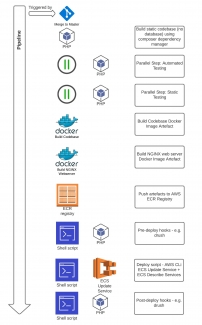
The diagram above shows the basic steps the pipeline follows. Let's have a look at these in turn with narrative and then see how that transposes into the Pipeline code.A few trivial housekeeping activities have been omitted from the diagram for clarity but will be discussed when we look at the code.
- Since my Badzilla blog is a hobby project, I don't have multiple environments, and merge all new features into the git master branch. Any merge into master triggers the build process. Commercial pipelines tend to trigger builds on feature branch commits too which may be a consideration depending upon your circumstances.
- I've already mentioned that the Docker image selected for the pipeline will be the official Drupal / PHP release - and thus contains composer which is used to build out the codebase.
- Once the codebase has been built the testing can be undertaken. I have identified two parallel steps in the pipeline - automated testing and static testing. I have covered the configuration for these in earlier blogs - so click through for further reading.
- The next steps involve building the two Docker image artefacts we need for our Fargate bundles - the PHP / FPM / Codebase image, and the NGINX Web Server image. The latter is required since we need to load a configuration for Drupal 9 and for serving the S3 / CloudFront assets.
- The artefacts are pushed into AWS ECR after being tagged latest.
- We are now ready to deploy the images to our ECS Cluster - but before we do this, we provide the opportunity to run any pre-deploy hooks. This would typically be activities such as drush putting the web app into maintenance mode to prevent public access during updates.
- One the pre-deploy scripts have completed, the deploy script is invoked. This forces an ECS service update on the cluster. The script loops to determine whether the update fails or completes, and upon a successful completion will move onto the final step.
- The post-deploy scripts are now run. These would be further drush commands to update the database schema for example, and to remove the maintenance mode flag.
image:
  name: drupal:9.2.6-php7.4-fpm

clone:
  depth: full

definitions:
  services:
    docker:
      memory: 2048

  steps:
    - step: &build-environment
        name: Build Environment
        script:
          # Install git & unzip for composer
          - apt-get update
          - apt-get install git unzip -y
          # Install dependencies
          - export COMPOSER_ALLOW_SUPERUSER=1
          - composer install
          # Copy project settings file in place
          - cp storage/settings.php web/sites/default/settings.php
          # Remove all non-essential dirs and files from top level directory
          - rm -rf assets backup databases .git
          - rm Makefile README.md docker-compose.yml composer.json composer.lock .env .csslintrc .eslintignore .eslintrc.json
          - rm .gitignore
          # Add the bind mount VOLUME so in Fargate the nginx container can do a VOLUME_FROM and load /opt/drupal docroot
          # from the core-drupal container
          - sed -i '/^FROM.*/a VOLUME ["/opt/drupal"]' Dockerfile > /dev/null 2>&1
        caches:
          - composer
        artifacts:
          - '**'

    # Automated Tests placeholder
    - step: &automated-tests
        name: Automated Tests
        script:
          - echo "Add automated tests here"

    # Static Analysis tests placeholder
    - step: &static-tests
        name: Static Analysis Tests
        script:
          - echo "Add static analysis here"

pipelines:
  # Run when code is merged / pushed into specific branches.
  branches:
    master:
      - step: *build-environment

      - parallel:
          - step: *automated-tests
          - step: *static-tests

      - step:
          name: Build & Deploy
          deployment: AWS Prod
          script:
            # Install AWS CLI
            - apt update && apt-get install -y jq unzip python3 python-dev python3-dev build-essential libssl-dev libffi-dev libxml2-dev libxslt1-dev zlib1g-dev python-pip
            - curl "https://s3.amazonaws.com/aws-cli/awscli-bundle-1.18.200.zip" -o "awscli-bundle.zip"
            - unzip awscli-bundle.zip
            - ./awscli-bundle/install -b ~/bin/aws
            - export PATH=~/bin:$PATH
            # Build the codebase + FPM
            - docker build -t badzilla-core-drupal .
            # Authenticate with ECR
            - aws configure set aws_access_key_id "${AWS_ACCESS_KEY}"
            - aws configure set aws_secret_access_key "${AWS_SECRET_KEY}"
            - aws ecr get-login --region "${AWS_REGION}" | sed -e 's/^.*-p \(.*\)\s\-\e.*$/\1/' |  docker login --password-stdin -u AWS "${CORE_DRUPAL_REPO_URL}"
            # Tag and push to the repo
            - docker tag badzilla-core-drupal:latest "${CORE_DRUPAL_REPO_URL}"
            - docker push "${CORE_DRUPAL_REPO_URL}"
            # NGINX_DRUPAL_REPO_URL
            - cd docker/nginx/fargate
            - docker build -t badzilla-nginx-drupal .
            - cd -
            # Authenticate with ECR
            - aws ecr get-login --region "${AWS_REGION}" | sed -e 's/^.*-p \(.*\)\s\-\e.*$/\1/' |  docker login --password-stdin -u AWS "${NGINX_DRUPAL_REPO_URL}"
            # Tag and push to the repo
            - docker tag badzilla-nginx-drupal:latest "${NGINX_DRUPAL_REPO_URL}"
            - docker push "${NGINX_DRUPAL_REPO_URL}"
            # Pre deploy Drush Commands
            - cd deploy-scripts
            - ./deploy-parser.sh ../webhooks/pre-deploy/
            - cd -
            # Deploy script
            - ./deploy-scripts/ecs-service-deploy.sh
            # Post deploy Drush Commands
            - cd deploy-scripts
            - ./deploy-parser.sh ../webhooks/post-deploy/
            - cd -
          services:
            - docker
          caches:
- dockerimage: name: drupal:9.2.6-php7.4-fpm
clone:
  depth: full

definitions:
  services:
    docker:
memory: 2048 steps:
- step: &build-environment
name: Build Environment
script:
# Install git & unzip for composer
- apt-get update
- apt-get install git unzip -y
# Install dependencies
- export COMPOSER_ALLOW_SUPERUSER=1
- composer install# Copy project settings file in place - cp storage/settings.php web/sites/default/settings.php # Remove all non-essential dirs and files from top level directory - rm -rf assets backup databases .git - rm Makefile README.md docker-compose.yml composer.json composer.lock .env .csslintrc .eslintignore .eslintrc.json - rm .gitignore
I then delete files and directories from the build which won't be needed in a production environment.
          # Add the bind mount VOLUME so in Fargate the nginx container can do a VOLUME_FROM and load /opt/drupal docroot
          # from the core-drupal container
          - sed -i '/^FROM.*/a VOLUME ["/opt/drupal"]' Dockerfile > /dev/null 2>&1
        caches:
          - composer
        artifacts:
- '**'# Automated Tests placeholder - step: &automated-tests name: Automated Tests script: - echo "Add automated tests here" # Static Analysis tests placeholder - step: &static-tests name: Static Analysis Tests script: - echo "Add static analysis here" pipelines: # Run when code is merged / pushed into specific branches. branches: master: - step: *build-environment - parallel: - step: *automated-tests - step: *static-tests
      - step:
          name: Build & Deploy
          deployment: AWS Prod
          script:
            # Install AWS CLI
            - apt update && apt-get install -y jq unzip python3 python-dev python3-dev build-essential libssl-dev libffi-dev libxml2-dev libxslt1-dev zlib1g-dev python-pip
            - curl "https://s3.amazonaws.com/aws-cli/awscli-bundle-1.18.200.zip" -o "awscli-bundle.zip"
            - unzip awscli-bundle.zip
            - ./awscli-bundle/install -b ~/bin/aws
- export PATH=~/bin:$PATHNote I am also installing the amazing utility jq - a JSON query language utility. This is imperative for inspecting the output of the CLI commands since their responses are sent in JSON format.
            # Build the codebase + FPM
            - docker build -t badzilla-core-drupal .
            # Authenticate with ECR
            - aws configure set aws_access_key_id "${AWS_ACCESS_KEY}"
            - aws configure set aws_secret_access_key "${AWS_SECRET_KEY}"
            - aws ecr get-login --region "${AWS_REGION}" | sed -e 's/^.*-p \(.*\)\s\-\e.*$/\1/' |  docker login --password-stdin -u AWS "${CORE_DRUPAL_REPO_URL}"
            # Tag and push to the repo
            - docker tag badzilla-core-drupal:latest "${CORE_DRUPAL_REPO_URL}"
            - docker push "${CORE_DRUPAL_REPO_URL}"
            # NGINX_DRUPAL_REPO_URL
            - cd docker/nginx/fargate
            - docker build -t badzilla-nginx-drupal .
            - cd -
            # Authenticate with ECR
            - aws ecr get-login --region "${AWS_REGION}" | sed -e 's/^.*-p \(.*\)\s\-\e.*$/\1/' |  docker login --password-stdin -u AWS "${NGINX_DRUPAL_REPO_URL}"
            # Tag and push to the repo
            - docker tag badzilla-nginx-drupal:latest "${NGINX_DRUPAL_REPO_URL}"
            - docker push "${NGINX_DRUPAL_REPO_URL}"
            # Pre deploy Drush Commands
            - cd deploy-scripts
            - ./deploy-parser.sh ../webhooks/pre-deploy/
            - cd -
            # Deploy script
            - ./deploy-scripts/ecs-service-deploy.sh
            # Post deploy Drush Commands
            - cd deploy-scripts
            - ./deploy-parser.sh ../webhooks/post-deploy/
            - cd -
          services:
            - docker
          caches:
            - docker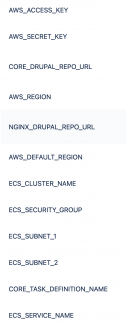
The pipeline and the shell scripts heavily use environmental variables that are set in the repository in Bitbucket. Their names are self-evident and listed in their entirety above.
deploy-scripts/deploy-parser.sh
#!/bin/bash

# Parse the passed files and issue commands in accordance.
# Currently only supports drush commands.
# This can be expanded out to other shell scripts.

# Output directory to be parsed
echo "Directory: $1 to be parsed"

set_network_configuration()
{
NETWORK=$(cat <<EOF
    {
        "awsvpcConfiguration":
            {
                "subnets": [
                    $1,
                    $2
                ],
                "securityGroups": [
                    $3
                ],
                "assignPublicIp": "ENABLED"
            }
    }
EOF
)
echo "${NETWORK}"
}


set_overrides_command()
{
OVERRIDES=$(cat <<EOF
	{
		"containerOverrides": [
		    {
		        "name": $1,
		        "command": [
		            $2
		        ]
		    }
		]
	}
EOF
)
echo "${OVERRIDES}"
}


# Process each line in a selected file
parse_line()
{
    # All lines to be processed must start with the word drush to be considered
    # This grep / sed combination will turn the drush command into docker cmd syntax
    grep -e "^drush" < "${1}" | while read -r line ; do
        cmd=`echo $line | sed -r 's/[^ ][^ ]*/"&"/g' | sed -r 's/\s+/,/g' | sed -r 's/drush/vendor\/bin\/drush/'`

        # @BUG with quoting in dotenv and how I load into environment. Appears to add newlines making it difficult to add quotes later.
        # So already added quotes for $CORE_TASK_DEFINITION_NAME in .env file but need the unquoted version in
        # --task-definition flag so unquote here
        TASK_DEF_UNQUOTE=`echo ${CORE_TASK_DEFINITION_NAME} | sed s/\"//g`

        # Now execute the command to start the container with the drush cmd
        FARGATE_TASK=`aws ecs run-task \
            --cluster "${ECS_CLUSTER_NAME}" \
            --task-definition "${TASK_DEF_UNQUOTE}" \
            --network-configuration "$(set_network_configuration  ${ECS_SUBNET_1} ${ECS_SUBNET_2}  ${ECS_SECURITY_GROUP})" \
            --launch-type FARGATE \
            --platform-version '1.4.0' \
            --region "${AWS_DEFAULT_REGION}" \
            --overrides "$(set_overrides_command ${CORE_TASK_DEFINITION_NAME} ${cmd})" | jq .tasks[0].taskArn -r`

        if [[ $? != 0 ]]; then
            echo "Fargate Run Task Failed."
            exit $?
        elif [[ -z  "${FARGATE_TASK}" ]]; then
            echo "Unspecified Fargate Run Task Failure."
            exit 1
        else
            echo "Cmd run is ${cmd}"
        fi

        # Loop round to check on the status of the task. Can't run in parallel so have to wait for each task to finish
        while true; do
            FARGATE_STATUS=`aws ecs describe-tasks --cluster "${ECS_CLUSTER_NAME}" --tasks "${FARGATE_TASK}"  | jq .tasks[0].lastStatus -r`

            if [[ -z "${FARGATE_STATUS}" ]]; then
                echo "Unspecified Fargate Describe Task Failure."
                exit 1
            fi

            echo "${FARGATE_STATUS}"

            if [[ "${FARGATE_STATUS}" == "STOPPED" ]] || [[ "${FARGATE_STATUS}" == "DEPROVISIONING" ]]; then
                  break
            fi

            sleep 20
        done

	echo "Drush command completed"
    done
}


# Get a list of all the files in the directory and process
parse_directory()
{
    # loop though all the files in the directory
    for file in "${1}"/*; do
        base="$(basename ${file})"
        echo "${base} being parsed"
        parse_line "${file}"
    done
}

parse_directory "${1}"
deploy-scripts/ecs-service-deploy.sh
#!/bin/bash


# Use the aws cli to force deploy Fargate task running in ECS service
aws ecs update-service --cluster "${ECS_CLUSTER_NAME}" --service "${ECS_SERVICE_NAME}" --force-new-deployment --region "${AWS_DEFAULT_REGION}"

# Give it a few seconds to take effect
sleep 5

# Get the deployment status by looping over the deployment
# Try for a maximum of 20 minutes then give up. Chances are after 20 minutes of incomplete
# deployment there is a problem in the task definition
for i in 1 2 3 4 5 6 7 8 9 10 11 12 13 14 15 16 17 18 19 20 21
do
    if [[ "${i}" -eq 21 ]]; then
        echo "Timed out before could determine if deployment succeeded"
        exit 1
    fi

    STATUS=`aws ecs describe-services --cluster "${ECS_CLUSTER_NAME}" --services "${ECS_SERVICE_NAME}" --region "${AWS_DEFAULT_REGION}" | jq .services[0].deployments[0].rolloutState -r`

    # Was it successful?
    if [[ "${STATUS}" = "COMPLETED"  ]]; then
        echo "Deployment succeeded"
        exit 0
    # Anything we need to be concerned about?
    elif [[ "${STATUS}" = "FAILED"  ]]; then
        echo "Deployment failed"
        exit 2
    # If still deploying echo this
    elif [[ "${STATUS}" = "IN_PROGRESS"  ]]; then
        echo "Deployment in progress"
    else
        echo "Unknown status "${STATUS}" so quitting"
        exit 3
    fi

    # Wait a minute before retrying
    sleep 60
done
The solution provides the capability to run drush during the pre- and post-deploy scripts. But what about running drush commands on an ad hoc basis from a remote laptop? This is often required by developers or devops and would be crucial for the management of a Drupal 9 website. Stay tuned for a future blog on how to achieve this!