
There are quite a few choices when it comes to running your own open source Caldav server, including heavyweight groupware solutions such as Scalix and Zimbra, and more dedicated caldav only servers such as DAViCal and Chandler. One of my users was having a problem connecting my jCaldav client to a DAVical server, so I decided to install DAViCal and try it out enabling me to (a) debug my jCaldav client, and (b) offer a hosted caldav server to the community for my sports fixtures. I was looking at Chandler for this, but its reliance on Tomcat and JAVA (and the associated hosting costs for this platform) was quite a deterrent. So, I opted for DAViCal. This tutorial is for the installation of a local copy of DAViCal on my home laptop. A future tutorial will concentrate on moving this to a publicly hosted server. Assumptions of this tutorial: You are expected to have Postgresql and Apache installed on your machine; if you don't, there are plenty of resources on the Internet to help you.
Download the source code and save the zipped tar file in the tmp directory. I got my code from sourceforge. Then extract the tarball - the output below is snipped.
aptop4:/tmp # tar zvxf davical*
davical-0.9.8.4/
davical-0.9.8.4/ChangeLog
davical-0.9.8.4/htdocs/
davical-0.9.8.4/htdocs/collection.php
davical-0.9.8.4/htdocs/images/
davical-0.9.8.4/htdocs/images/down.gif
davical-0.9.8.4/htdocs/images/up.gif
davical-0.9.8.4/htdocs/tools.php
davical-0.9.8.4/htdocs/css/
davical-0.9.8.4/htdocs/css/edit.css
davical-0.9.8.4/htdocs/css/browse.css
davical-0.9.8.4/htdocs/admin.php
davical-0.9.8.4/htdocs/help.php
davical-0.9.8.4/htdocs/davical.css
davical-0.9.8.4/htdocs/js/
davical-0.9.8.4/htdocs/js/browse.js
davical-0.9.8.4/htdocs/setup.php
davical-0.9.8.4/htdocs/public.php
davical-0.9.8.4/htdocs/.htaccess
davical-0.9.8.4/htdocs/index.php
davical-0.9.8.4/htdocs/upgrade.php
davical-0.9.8.4/htdocs/caldav.php
davical-0.9.8.4/htdocs/freebusy.php
davical-0.9.8.4/htdocs/.gitignore
davical-0.9.8.4/htdocs/relationship_types.php
davical-0.9.8.4/COPYING
davical-0.9.8.4/CREDITS
davical-0.9.8.4/config/
davical-0.9.8.4/config/example-administration.yml
.....
laptop4:/srv/www/htdocs # cd /srv/www/htdocs
laptop4:/srv/www/htdocs # mkdir davical
laptop4:/srv/www/htdocs # cp -R /tmp/davical*/. davical/.
laptop4:/srv/www/htdocs # cd davical
laptop4:/srv/www/htdocs/davical # ls
.gitignore  CREDITS    INSTALL   README  VERSION  dba     docs    inc  scripts
COPYING     ChangeLog  Makefile  TODO    config   debian  htdocs  po   testing
laptop4:/srv/www/htdocs/davical # cd ..
laptop4:/srv/www/htdocs # chown -R wwwrun:www davical
laptop4:/srv/www/htdocs #
laptop4:/tmp # ls awl*
awl-638f24382d02e0561560e509e4ff61dd31442714.tar.gz
laptop4:/tmp # tar xvzf awl-63*
awl/
awl/.gitignore
awl/COPYING
awl/ChangeLog
awl/Makefile
awl/README
awl/TODO
awl/VERSION
awl/dba/
awl/dba/awl-tables.sql
awl/dba/grant-minimum-permissions.sh
awl/dba/grant-on-all-tables.sh
awl/dba/schema-management.sql
awl/debian/
.....
laptop4:/tmp # cd /srv/www/htdocs/davical
laptop4:/srv/www/htdocs/davical # mkdir awl
laptop4:/srv/www/htdocs/davical # cp -R /tmp/awl/* awl/.
laptop4:/srv/www/htdocs/davical # chown -R wwwrun:www awl
laptop4:/srv/www/htdocs/davical # ls awl
COPYING  ChangeLog  Makefile  README  TODO  VERSION  dba  debian  docs  inc
laptop4:/srv/www/htdocs/davical #
The path to awl needs to be added to the PHP includes path. Andrew is suggesting adding it to the httpd.conf file which won't be an option if you, like me, are intending on ultimately putting an instance on a hosted website. So, we need to create a .htaccess file instead and place it in the document root of davical - in our case it is /srv/www/htdocs/davical
.htaccess
php_value include_path ".:/usr/share/php5:/usr/share/php5/PEAR:../awl/inc"
php_value magic_quotes_gpc 0
php_value register_globals 0
php_value open_basedir 1
Alias /davical /srv/www/htdocs/davical/htdocs
<VirtualHost *>
ServerName davical
DocumentRoot /srv/www/htdocs/davical

<Directory /srv/www/htdocs/davical>
Options -Indexes FollowSymLinks
AllowOverride All
DirectoryIndex index.php index.htm default.htm
</Directory>
</VirtualHost>
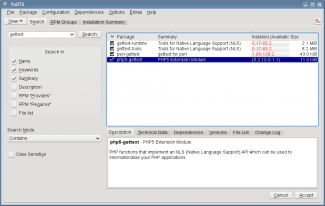
Andrew's code requires the gettext() PHP function which is not included by default in openSUSE. So, click on Kickoff->Computer->Install Software and search on the string gettext. You will see the PHP gettext library which you should click and submit. Note that on my system I am using PHP 5.2 despite being on openSUSE 11.2 (which defaults to PHP 5.3) due to incompatibilities with my Drupal CMS work. Therefore my version numbers will probably be different from yours.
laptop4:/srv/www/htdocs # /etc/init.d/apache2 restart
Syntax OK
Shutting down httpd2 (waiting for all children to terminate)  done
Starting httpd2 (prefork)                                  done
laptop4:/srv/www/htdocs #
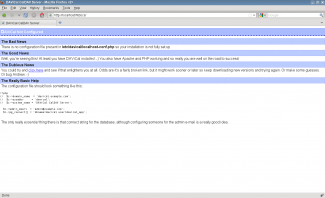
Now we are ready for a test - open a browser and point it to localhost/htdocs and you will see the screen on the left if all is well. It looks like this Andrew bloke has a sense of humour - he is pointing out that we have no configuration yet. True, but this is a proof of concept and now we have DAViCal installed and running, let's get it configured correctly.
The database creation script is /srv/www/htdocs/davical/dba/create-database.sh but before it can be run there's a couple of items to sort out. Firstly, the script looks in the wrong place for the AWL code so that needs to be edited. So load the file into your favourite editor and change the AWLDIR variable. I have commented out the old value so you can locate it, and replace it with the amended path below.
create-database.sh
#
# Attempt to locate the AWL directory
#AWLDIR="${DBADIR}/../../awl"
AWLDIR="${DBADIR}/../awl"
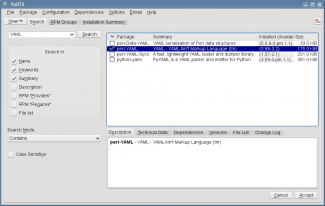
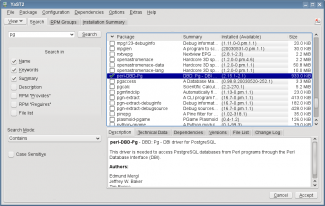
The script has dependencies on Perl libraries YAML and Pg so they need to be installed before we run the script. Again click on Kickoff->Computer->Install Software and search for the libraries and install.
Ok we are now ready to run the script - so here goes:
laptop4:/ # su postgres -c /srv/www/htdocs/davical/dba/create-database.sh
Supported locales updated.
Updated view: dav_principal.sql applied.
CalDAV functions updated.
RRULE functions updated.
Database permissions updated.
NOTE
====
*  The password for the 'admin' user has been set to 'xxxxxxxx'"

Thanks for trying DAViCal!  Check in /usr/share/doc/davical/examples/ for
some configuration examples.  For help, visit #davical on irc.oftc.net.

laptop4:/ #
laptop4:/ # cd /srv/www/htdocs/davical/config
laptop4:/srv/www/htdocs/davical/config # cp example-config.php config.php
laptop4:/srv/www/htdocs/davical/config #
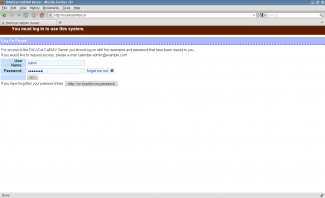
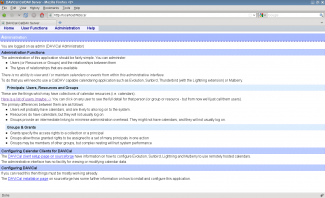
Finally we are ready to check the fruits of our labour. Point a web browser at localhost/htdocs and you'll see the login screen on the left. Once you have logged using the password generated by the database setup script, you'll see the admin screen to the right.