
Load testing is an important aspect of delivering an enterprise solution. Load testing can monitor the system's response times for each of the transactions during a set period of time. Load testing can also raise attention to any problems in the application software and fix these bottlenecks before they become more problematic.
So we've established that load testing is necessary. Tools for load testing Lambda functions are scarce, but there is serverless-artillery, which is of course based on the artillery nodejs application. So this is our choice for load testing our voting app.
$ npm install -g artillery
$ npm install -g serverless-artillery
$ ls -als /usr/local/lib/node_modules/
total 48
4 drwxr-xr-x 12 nigel www-data 4096 Apr 12 11:11 .
4 drwxr-xr-x  6 root  root     4096 Apr 17  2017 ..
4 drwxrwxr-x  7 nigel www-data 4096 Apr 12 10:07 artillery
4 drwxrwxr-x  4 nigel www-data 4096 Apr 17  2017 casper-chai
4 drwxrwxr-x  9 nigel www-data 4096 Apr 17  2017 casperjs
4 drwxrwxr-x  6 nigel www-data 4096 Apr 30  2017 localtunnel
4 drwxrwxr-x  6 nigel www-data 4096 Apr 17  2017 mocha
4 drwxrwxr-x  4 nigel www-data 4096 Apr 17  2017 mocha-casperjs
4 drwxrwxr-x  4 nigel www-data 4096 Nov 26 19:30 n
4 drwxrwxr-x 11 nigel www-data 4096 Nov 26 19:26 npm
4 drwxrwxr-x  6 nigel www-data 4096 Dec 23 11:15 serverless
4 drwxrwxr-x  6 nigel www-data 4096 Apr 12 11:10 serverless-artillery
$ cd /var/www/html
$ mkdir serverless-artillery
$ cd serverless-artillery
$ slsart configure
$ ls -las
total 112
 4 drwxrwxr-x   3 nigel    www-data  4096 Apr 12 11:27 .
 4 drwxrwxr-x  17 www-data www-data  4096 Apr 12 11:16 ..
48 -rw-rw-r--   1 nigel    www-data 46843 Apr 12 11:27 handler.js
 4 drwxrwxr-x 152 nigel    www-data  4096 Apr 12 11:27 node_modules
 4 -rw-rw-r--   1 nigel    www-data   222 Apr 12 11:27 package.json
44 -rw-rw-r--   1 nigel    www-data 41915 Apr 12 11:27 package-lock.json
 4 -rw-rw-r--   1 nigel    www-data  1329 Apr 12 11:27 serverless.yml
$ head -20 serverless.yml | tail -6
provider: # Using Node JS v4.3 on AWS
  name: aws
  region: eu-west-1
  runtime: nodejs6.10
  iamRoleStatements:
    - Effect: "Allow"

$ slsart deploy

	Deploying Lambda to AWS...

Serverless: Packaging service...
Serverless: Excluding development dependencies...
Serverless: Creating Stack...
Serverless: Checking Stack create progress...
.....
Serverless: Stack create finished...
Serverless: Uploading CloudFormation file to S3...
Serverless: Uploading artifacts...
Serverless: Uploading service .zip file to S3 (5.45 MB)...
Serverless: Validating template...
Serverless: Updating Stack...
Serverless: Checking Stack update progress...
...............
Serverless: Stack update finished...
Service Information
service: serverless-artillery-Bk1YNhhsM
stage: dev
region: eu-west-1
stack: serverless-artillery-Bk1YNhhsM-dev
api keys:
  None
endpoints:
  None
functions:
  loadGenerator: serverless-artillery-Bk1YNhhsM-dev-loadGenerator

	Deploy complete.
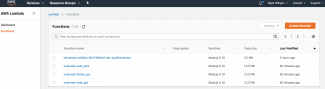
$ cd /var/www/html/serverless-vote
$ cat serverless.yml | grep stage | grep dev
  stage: ${opt:stage, 'dev'}
$ sls deploy --stage test --no-color
Serverless: Packaging service...
Serverless: Excluding development dependencies...
Serverless: Uploading CloudFormation file to S3...
Serverless: Uploading artifacts...
Serverless: Uploading service .zip file to S3 (12.53 MB)...
Serverless: Validating template...
Serverless: Updating Stack...
Serverless: Checking Stack update progress...
...........................................................................
Serverless: Stack update finished...
Service Information
service: vote
stage: test
region: eu-west-1
stack: vote-test
api keys:
  None
endpoints:
  GET - https://bnz9qsvtm1.execute-api.eu-west-1.amazonaws.com/test/
  POST - https://bnz9qsvtm1.execute-api.eu-west-1.amazonaws.com/test/
  POST - https://bnz9qsvtm1.execute-api.eu-west-1.amazonaws.com/test/thank_you
functions:
  vote_get: vote-test-vote_get
  vote_post: vote-test-vote_post
  thank_you: vote-test-thank_you
$ sls syncToS3 --stage test
Serverless: s3,sync,dist/,s3://vote-test-webapps3bucket-ncaevy1jcsry/
upload: dist/images/favicon.ico to s3://vote-test-webapps3bucket-ncaevy1jcsry/images/favicon.ico
upload: dist/css/default.css to s3://vote-test-webapps3bucket-ncaevy1jcsry/css/default.css
upload: dist/images/badzilla-logo32x32.png to s3://vote-test-webapps3bucket-ncaevy1jcsry/images/badzilla-logo32x32.png

Serverless: stderr undefined
Serverless: Successfully synced to the S3 bucket
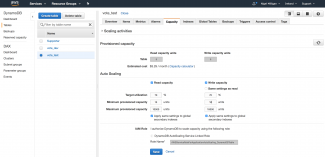
We are going to load test the vote_post function, so we should ensure that the DynamoDB Auto Scaling feature is enabled, along with minimum and maximum read and write capacity parameters. Navigate to Services->DynamoDB->Tables->{vote_test}->Capacity and you can see in the screenshot above I've elected to put the minimum capacity for read and writes to by 10 per second. I am not intending to really stretch DynamoDB too far for my load testing since this is a hobby project and DynamoDB costs can escalate out of hand quickly without prudence.
$ pwd
/var/www/html/serverless-vote
$ mkdir artillery
$ cd artillery
$ cat vote_post.yml
config:
  # this hostname will be used as a prefix for each URI in the flow unless a complete URI is specified
  target: "https://bnz9qsvtm1.execute-api.eu-west-1.amazonaws.com"
  phases:
    - duration: 300
      arrivalRate: 1
      rampTo: 10
scenarios:
  - name: "Post form"
    flow:
      - post:
          url: "/test"
          form:
            first_name: "Fred"
            last_name: "Blogs"
            optradio: "phpstorm"
$ cd ../serverless-artillery/
$ slsart invoke -p ../serverless-vote/artillery/vote_post.yml

	Invoking test Lambda


	Your function has been invoked. The load is scheduled to be completed in 300 seconds.
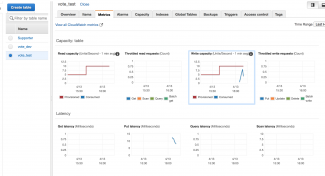
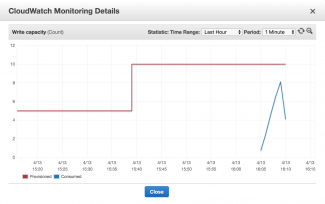
Once the load test completes there are monitoring screens that can be examined to determine the results. By navigating to the Metrics tab on the AWS Console DynamoDB vote_test, we can see the topmost screenshot above. The red line on the graph indicates where I have set the minimum provisioning thresholds. If we look at the Write Capacity metric we can also see a small blue line of the number of writes per second during the test. We didn't quite achieve ten per second. It's also useful to look at the rightmost metric - Throttled Write Requests. Thankfully the count is zero and this is important. I have noticed empirically that with throttling, there comes a nasty side effect - the AWS SDK putItem can timeout thus causing an exception to be thrown in the model code.
The second screenshot shows a zoomed view of the Write Capacity with five minute intervals. The most writes per second reached 8 diring our test.
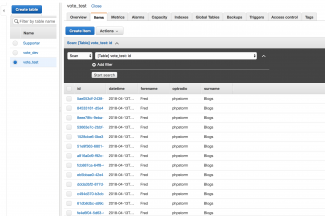
By navigating to the Items tab (screenshot 3) we can see that we have a whole swathe of records that have been created in the DynamoDB database - this is exactly what we would expect.
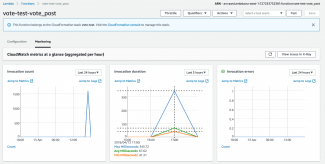
Next we navigate to Services->Lambda->Functions->{vote_test_vote_post}->Monitoring and we can see three metrics - all of which are important. We achieved over 1500 invocations of the function in the five minutes (leftmost graphic). The Invocation Duration is interesting - we averaged a completion time of 67 milliseconds which is very fast. There was a maximum of 343 milliseconds - still very acceptable, and clearly juding where the maximum peak is in comparison to the average, there can't have been too many functions that were near the top end of that maximum. The rightmost metric - Invocation Errors - is crucial. If we got time outs caused by DynamoDB write throttling, we would see some activity on this metric. Thankfully there is nothing so we know all is good.
We can also use the command line - for instance to get the number of records created during the run we can issue:
$ aws dynamodb scan --table-name=vote_test
{snipped output}
        {
            "optradio": {
                "S": "phpstorm"
            },
            "datetime": {
                "S": "2018-04-13T16:10:18"
            },
            "surname": {
                "S": "Blogs"
            },
            "id": {
                "S": "6949cf80-336f-4536-a86d-4be164861597"
            },
            "forename": {
                "S": "Fred"
            }
        }
    ],
    "ScannedCount": 1596,
    "ConsumedCapacity": null
}