
One of the drawbacks of developing AWS Lambda apps is the time it takes to deploy any changes to code. In addition there are financial costs to repeatedly uploading the lambda executable to an AWS S3 bucket, exacerbated by the need in our case to upload a PHP image. The upload triggers GET Lambda costs and storage costs so it is a double whammy.
Ideally a development regime should be implemented whereby most development is undertaken locally and only deployed to AWS when the developer has a high degree of confidence there are no outstanding bugs.
In an earlier blog we discussed how to set up a local copy of DynamoDB - so now we have the ammunition to perform our development locally. Up until now I have been spoon-feeding all my code - but in reality development is an iterative process of building out functionality and fixing bugs. Let's see how we can do this.
$ ps -ef | grep java
nigel     1142     1  0 Apr09 ?        00:00:00 /usr/bin/daemon --name=jenkins --inherit --env=JENKINS_HOME=/var/lib/jenkins --output=/var/log/jenkins/jenkins.log --pidfile=/var/run/jenkins/jenkins.pid -- /usr/bin/java -Djava.awt.headless=true -jar /usr/share/jenkins/jenkins.war --webroot=/var/cache/jenkins/war --httpPort=8080
nigel     1143  1142  0 Apr09 ?        00:07:12 /usr/bin/java -Djava.awt.headless=true -jar /usr/share/jenkins/jenkins.war --webroot=/var/cache/jenkins/war --httpPort=8080
nigel     8748  8694  0 10:13 pts/1    00:00:00 grep --color=auto java
$ cd /usr/lib/dynamodb/
$ java -Djava.library.path=./DynamoDBLocal_lib -jar DynamoDBLocal.jar -sharedDb -dbPath /home/nigel
Initializing DynamoDB Local with the following configuration:
Port:	8000
InMemory:	false
DbPath:	/home/nigel
SharedDb:	true
shouldDelayTransientStatuses:	false
CorsParams:	*
$ aws dynamodb create-table --table-name=vote_dev --attribute-definitions AttributeName=id,AttributeType=S --key-schema AttributeName=id,KeyType=HASH --provisioned-throughput ReadCapacityUnits=5,WriteCapacityUnits=5  --endpoint-url http://localhost:8000
{
    "TableDescription": {
        "TableArn": "arn:aws:dynamodb:ddblocal:000000000000:table/vote_dev",
        "AttributeDefinitions": [
            {
                "AttributeName": "id",
                "AttributeType": "S"
            }
        ],
        "ProvisionedThroughput": {
            "NumberOfDecreasesToday": 0,
            "WriteCapacityUnits": 5,
            "LastIncreaseDateTime": 0.0,
            "ReadCapacityUnits": 5,
            "LastDecreaseDateTime": 0.0
        },
        "TableSizeBytes": 0,
        "TableName": "vote_dev",
        "TableStatus": "ACTIVE",
        "KeySchema": [
            {
                "KeyType": "HASH",
                "AttributeName": "id"
            }
        ],
        "ItemCount": 0,
        "CreationDateTime": 1523353381.749
    }
}
$ aws dynamodb list-tables --endpoint-url http://localhost:8000
{
    "TableNames": [
        "vote_dev"
    ]
}
<?php
'endpoint' => 'http://localhost:8000'
?>VoteModel.php **WRONG**
<?php
    protected $client_config = [
        'region' => 'eu-west-1',
        'version' => '2012-08-10',
        'credentials.cache' => TRUE,
        'validation' => FALSE,
        'endpoint' => 'http://localhost:8000',
        'scheme' => 'http'
    ];
?>VoteModel.php **CORRECT**
<?php
    protected function loadClient()
    {
        $this->client_config['credentials'] = \Aws\Credentials\CredentialProvider::env();
        if ($this->data['requestContext']['stage'] == 'local') {
            $this->client_config['endpoint'] = 'http://localhost:8000';
        }
        return(new DynamoDbClient($this->client_config));
    }
?>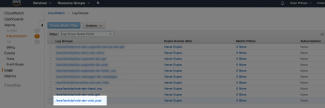
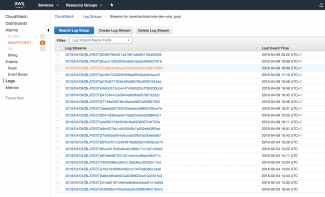
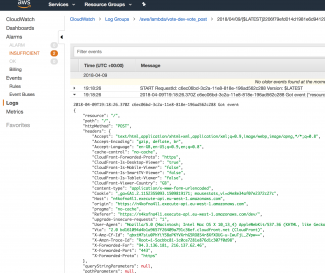
When we invoke a Lambda function locally, we need to ensure the environment is set up correctly for it. This includes the routing information (since we don't have a local copy of API Gateway) and the run time data that the Lambda function will be asked to process. In our case that would be the submitted POSTed form data. So how do we build this? We can handcraft some JSON which includes all this information, but it's time consuming. A much easier approach is to copy the data directly from a previous AWS invocation in the CloudWatch logs - this is where our Got event debug trace pays dividends!
Navigate to the Cloudwatch logs and you'll see a list of all the Lambda functions (see first screenshot above). Select the form POST function which in my case is /aws/lambda/vote-dev-vote_post. This takes us to the list of previous invocations (second screenshot) - I've done quite a lot which is a side effect of blogging! Select the top one and open up a Got event log entry (third screenshot). Select the dumped JSON object and copy it to your clipboard.
This can then be saved in a file. I created a new subdirectory under the project's top directory called data and I named this file post.json
data/post.json
"stage": "local",
$ sls invoke local -f vote_post --no-color -p data/post.json
Got event {"resource":"/","path":"/","httpMethod":"POST","headers":{"Accept":"text/html,application/xhtml+xml,application/xml;q=0.9,image/webp,image/apng,*/*;q=0.8","Accept-Encoding":"gzip, deflate, br","Accept-Language":"en-GB,en-US;q=0.9,en;q=0.8","cache-control":"no-cache","CloudFront-Forwarded-Proto":"https","CloudFront-Is-Desktop-Viewer":"true","CloudFront-Is-Mobile-Viewer":"false","CloudFront-Is-SmartTV-Viewer":"false","CloudFront-Is-Tablet-Viewer":"false","CloudFront-Viewer-Country":"GB","content-type":"application/x-www-form-urlencoded","Cookie":"_ga=GA1.2.1152355093.1509819171; mousestats_vi=d4e8e34af07e2372c27c","Host":"n4kofna4l1.execute-api.eu-west-1.amazonaws.com","origin":"https://n4kofna4l1.execute-api.eu-west-1.amazonaws.com","pragma":"no-cache","Referer":"https://n4kofna4l1.execute-api.eu-west-1.amazonaws.com/dev/","upgrade-insecure-requests":"1","User-Agent":"Mozilla/5.0 (Macintosh; Intel Mac OS X 10_13_4) AppleWebKit/537.36 (KHTML, like Gecko) Chrome/65.0.3325.181 Safari/537.36","Via":"2.0 bd161094d4b1a9657f26409a791c36ef.cloudfront.net (CloudFront)","X-Amz-Cf-Id":"qbxtM7siu0PhYiY58aPKYVXrhG5RO8S4r8XfXOUG-u-IwuTjL_2Vpw==","X-Amzn-Trace-Id":"Root=1-5acbbc81-1c0ce7281e876d1c307f0d98","X-Forwarded-For":"94.3.136.181, 216.137.62.46","X-Forwarded-Port":"443","X-Forwarded-Proto":"https"},"queryStringParameters":null,"pathParameters":null,"stageVariables":null,"requestContext":{"resourceId":"lp67djpm80","resourcePath":"/","httpMethod":"POST","extendedRequestId":"FFpkSGhmjoEFlug=","requestTime":"09/Apr/2018:19:18:25 +0000","path":"/dev/","protocol":"HTTP/1.1","stage":"local","requestTimeEpoch":1523301505841,"requestId":"c6eb6aa6-3c2a-11e8-8346-13d846b589a2","identity":{"cognitoIdentityPoolId":null,"accountId":null,"cognitoIdentityId":null,"caller":null,"accessKey":null,"cognitoAuthenticationType":null,"cognitoAuthenticationProvider":null,"userArn":null,"userAgent":"Mozilla/5.0 (Macintosh; Intel Mac OS X 10_13_4) AppleWebKit/537.36 (KHTML, like Gecko) Chrome/65.0.3325.181 Safari/537.36","user":null},"apiId":"n4kofna4l1"},"body":"first_name=Joe&last_name=Soap&optradio=phpstorm","isBase64Encoded":false,"static_url":"https://s3-eu-west-1.amazonaws.com/vote-dev-webapps3bucket-1htbi30lx4nii","dynamodb_table":"vote_dev"} []
{
    "headers": {
        "Location": "https://n4kofna4l1.execute-api.eu-west-1.amazonaws.com/local/thank_you"
    },
    "statusCode": 307,
    "body": ""
}
$ aws dynamodb scan --table-name=vote_dev --endpoint-url http://localhost:8000
{
    "Count": 1,
    "Items": [
        {
            "optradio": {
                "S": "phpstorm"
            },
            "forename": {
                "S": "Joe"
            },
            "surname": {
                "S": "Soap"
            },
            "id": {
                "S": "4679de4d-1726-436e-b24b-755415b6298a"
            },
            "datetime": {
                "S": "2018-04-11T09:45:54"
            }
        }
    ],
    "ScannedCount": 1,
    "ConsumedCapacity": null
}
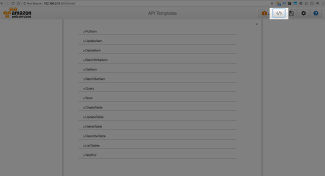
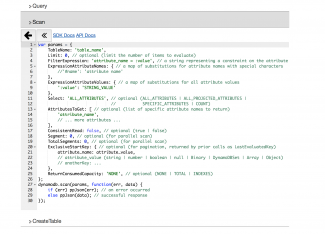
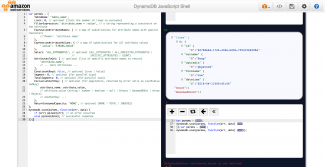
This is more complicated than the command line, but is more powerful and would be ideally suited to someone with a good understanding of JavaScript. Go to your console shell at http://{your_ip_address}:8000/shell/ and click the </> button as shown in the first screenshot. This will provide a list of JavaScript templates. Click the Scan template and it will expand to show the sample JavaScript as per the second screenshot. Click the thick left arrow and the console will appear for you to edit code and run it (the third screenshot).
Now here's the (slightly) fiddly bit. The code has a great many parameters which can be supplied, but we don't need that. We just want to dump all records in their entireity. So cut all the parameters we don't need. For convenience I have pasted below what you need to leave in. It's quite obvious, but copy this over the entire code in the console.
var params = {
    TableName: 'vote_dev',
    Limit: 10, // optional (limit the number of items to evaluate)
    Select: 'ALL_ATTRIBUTES', // optional (ALL_ATTRIBUTES | ALL_PROJECTED_ATTRIBUTES |
                              //           SPECIFIC_ATTRIBUTES | COUNT)
    ConsistentRead: false, // optional (true | false)
    ReturnConsumedCapacity: 'NONE', // optional (NONE | TOTAL | INDEXES)
};
dynamodb.scan(params, function(err, data) {
    if (err) ppJson(err); // an error occurred
    else ppJson(data); // successful response
});
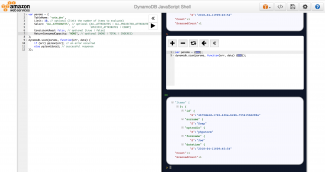
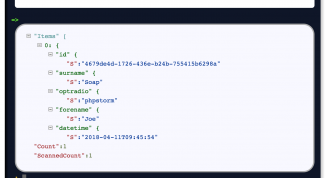
The first screenshot above shows the console after it has completed the playback of the JavaScript code. The second screenshot shows a zoomed view of the results. The results are exactly what we put into the local invocation so it is fine.
The example I have shown above relates to the form's POSTed submission. To develop the original form GET and the redirect to the thank_you page, simply change the function names in the local invocation. The POST is the most complex since it performs the database write. The others shouldn't be too onerous in comparison!