
$ pwd
/var/www/html/serverless-vote
$ mkdir -p src/Models
$ touch src/Models/VoteModel.php
$ touch src/Models/PutVote.php
$ composer require aws/aws-sdk-php
Using version ^3.54 for aws/aws-sdk-php
<?php

namespace Vote\Models;


use Aws\DynamoDb\DynamoDbClient;


abstract class VoteModel {


    protected $data;
    protected $logger;

    protected $client_config = [
        'region' => 'eu-west-1',
        'version' => '2012-08-10',
        'credentials.cache' => TRUE,
        'validation' => FALSE,
        'scheme' => 'http'
    ];


    public function __construct($logger, $data)
    {
        $this->logger = $logger;
        $this->data = $data;
    }


    public function __set($key, $value)
    {
        $this->$key = $value;
    }


    public function __get($key)
    {
        return $this->$key;
    }

    /**
     * Get an aws sdk client for extended classes
     *
     * @return \Aws\DynamoDb\DynamoDbClient
     */
    protected function loadClient()
    {
        $this->client_config['credentials'] = \Aws\Credentials\CredentialProvider::env();
        return(new DynamoDbClient($this->client_config));
    }

}
?>The loadClient method instantiates the DynamoDB client, and note that we are getting the necessary credentials from the environment which will be passed to the client.
<?php

namespace Vote\Models;

use Aws\DynamoDb\Exception\DynamoDbException;


class PutVote extends VoteModel {


    private $id = '';


    /**
     * Put request to AWS DynamoDB API
     *
     *
     * @param array $payload
     */
    public function put($payload)
    {
        $client = $this->loadClient();

        $this->id = $this->generateUUID();
        $current_datetime = date('Y-m-d\TH:i:s');

        $item = [
            'id'               => ['S' => $this->id], // Primary Key
            'forename'        => ['S' => $payload['first_name']],
            'surname'        => ['S' => $payload['last_name']],
            'datetime'        => ['S' => $current_datetime],
            'optradio'      => ['S' => $payload['optradio']],
        ];

        try {
            $client->putItem(array(
                'TableName' => $this->data['dynamodb_table'],
                'Item' => $item
            ));
        } catch (DynamoDbException $e) {
            $this->logger->notice('DynamoDB Put Failed', array(
                'table'         => $this->data['dynamodb_table'],
                'id'             => $this->id,
                'RequestID'     => $e->getAwsRequestId(),
                'ErrorType'     => $e->getAwsErrorType(),
                'ErrorCode'     => $e->getAwsErrorCode(),
                'ErrorMessage'    => $e->getAwsErrorMessage(),
                'StatusCode'     => $e->getStatusCode()
            ));
            return TRUE;
        }
        return FALSE;
    }


    /**
     * Create a UUID - PHP doesn't have a good function for this, so hand-rolled
     *
     * @see https://rogerstringer.com/2013/11/14/generate-uuids-php/
     *
     * @return string generated UUID
     */
    protected function generateUUID()
    {
        return sprintf( '%04x%04x-%04x-%04x-%04x-%04x%04x%04x',
            mt_rand( 0, 0xffff ), mt_rand( 0, 0xffff ),
            mt_rand( 0, 0xffff ),
            mt_rand( 0, 0x0fff ) | 0x4000,
            mt_rand( 0, 0x3fff ) | 0x8000,
            mt_rand( 0, 0xffff ), mt_rand( 0, 0xffff ), mt_rand( 0, 0xffff )
        );
    }
}
?>serverless.yml
  environment:
    STATIC_URL: https://s3-${self:provider.region}.amazonaws.com/${self:custom.s3StaticBucket}
DYNAMODB_TABLE: vote_${self:provider.stage}## Specify the DynamoDB Table DynamoDbTable: Type: AWS::DynamoDB::Table Properties: TableName: vote_${self:provider.stage} AttributeDefinitions: - AttributeName: id AttributeType: S KeySchema: - AttributeName: id KeyType: HASH ProvisionedThroughput: ReadCapacityUnits: 5 WriteCapacityUnits: 5 DynamoDBIamPolicy: Type: AWS::IAM::Policy DependsOn: DynamoDbTable Properties: PolicyName: lambda-dynamodb PolicyDocument: Version: '2012-10-17' Statement: - Effect: Allow Action: - dynamodb:GetItem - dynamodb:PutItem Resource: arn:aws:dynamodb:*:*:table/vote_${self:provider.stage} Roles: - Ref: IamRoleLambdaExecution
handler.php
<?php
// Get the handler service and execute
$handler = $container->get(getenv('HANDLER'));
$event['static_url'] = getenv('STATIC_URL');
$event['dynamodb_table'] = getenv('DYNAMODB_TABLE');
?>
$ sls deploy
Serverless: Packaging service...
Serverless: Excluding development dependencies...
Serverless: Uploading CloudFormation file to S3...
Serverless: Uploading artifacts...
Serverless: Uploading service .zip file to S3 (12.53 MB)...
Serverless: Validating template...
Serverless: Updating Stack...
Serverless: Checking Stack update progress...
................................
Serverless: Stack update finished...
Service Information
service: vote
stage: dev
region: eu-west-1
stack: vote-dev
api keys:
  None
endpoints:
  GET - https://n4kofna4l1.execute-api.eu-west-1.amazonaws.com/dev/
  POST - https://n4kofna4l1.execute-api.eu-west-1.amazonaws.com/dev/
  POST - https://n4kofna4l1.execute-api.eu-west-1.amazonaws.com/dev/thank_you
functions:
  vote_get: vote-dev-vote_get
  vote_post: vote-dev-vote_post
  thank_you: vote-dev-thank_you
Serverless: Removing old service versions...
FormController.php
<?php
    public function save()
    {
        // Get the data ready for for the model and the redirect
        $data = $this->__get('data');
        parse_str($data['body'], $params);
        $model = $this->createModel('PutVote');

        // Bail on Error
        if ($model->put($params)) {
            return $this->_index(
                'vote.html',
                [
                'static_url' => $data['static_url'],
                'title' => 'Badzilla\'s Lambda Vote Form',
                'error' => 'Something has gone wrong with your submission. Please try later.'
            ]);
        }

        // Construct the url using the Lambda data we have
        $url = $data['headers']['X-Forwarded-Proto'].'://';
        $url .= $data['headers']['Host'];
        if (isset($data['requestContext']['stage']) && $data['requestContext']['stage'] != '') {
            $url .= '/'.$data['requestContext']['stage'];
        }
        $url .= '/thank_you';

        // Set the required http settings for a redirect resubmit POST
        $this->__set('statusCode', 307);
        $this->__set('headers', array('Location' => $url));

        // No body text to return
        return '';
    }
?>ThankYouController.php
<?php
    public function index()
    {
        parse_str($this->data['body'], $params);

        return $this->_index(
            'thank-you.html',
            [
                'title' => 'Badzilla\'s Big Thank You',
                'static_url' => $this->data['static_url'],
                'first_name' => htmlspecialchars($params['first_name'], ENT_QUOTES, 'UTF-8'),
                'last_name' => htmlspecialchars($params['last_name'], ENT_QUOTES, 'UTF-8'),
            ]
        );
    }
?>"autoload": { "psr-4": { "Raines\\Serverless\\": "src", "Vote\\Controllers\\": "src/Controllers/", "Vote\\Models\\": "src/Models/", "Twig\\": "vendor/twig/twig/lib" } },
$ composer dump-autoload
Generating autoload files
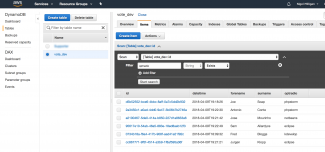
The code can now be deployed (as per the instructions earlier) and by pointing a browser to the dev instance of the site, records can be successfully added to the DynamoDB database. By navigating in the AWS Console to Services->DynamoDV->Tables->{select vote_dev}->Items we can see that the records are being created successfully.
The solution is now functionally ok but there is a long way to go before we are production ready. Also I have spoon fed the code, but in the real world there would have been plenty of trial and error, and problems to solve. To cut down the endless deploy to AWS/test cycle, it is better to develop and test as far as possible locally. We prepped for this in the earlier blog A Real World PHP Lambda App Part 4: Setting up DynamoDb Locally and in the next blog I'll show you how to develop locally.